Now your customers can exchange instead of return
A return is often simply a customer who received the wrong size. Now your customers can select “Exchange for something else” directly in the returns center, so they quickly get the right item, and you retain the revenue. The system automatically calculates the difference and creates a credit memo , a new order, and a payment link or store credit.
Returns are one of the biggest hidden costs for an online store. It takes time to process them, there are shipping costs, and every time a customer returns an item for a refund, you usually lose that sale. But the truth is that a great many returns aren’t actually because the customer is dissatisfied. The customer simply received the wrong size or has second thoughts about the color.
That’s why we’ve built a new feature into Shoporama’s returns center: Exchanges. Instead of only being able to return an item for a refund, your customers can now select “Exchange for something else” and swap it directly for a different size or an entirely different product. You keep the revenue, the customer gets the right item faster, and the system handles most of the paperwork for you.
Why Exchanges Beat “Return and Buy Again”
The traditional process is for the customer to return the item, get a refund, and then maybe—or maybe not—place a new order. Each of these steps is a potential point where the sale can fall through. When the customer exchanges the item instead, you keep the entire transaction together in a single flow.
- You retain the revenue. Instead of a refund and a lost sale, you get an exchange where the money stays in the store.
- Fewer lost sales due to sizing. The classic clothing problem—where a medium should have been a large—is solved with a few clicks instead of a whole new order.
- The customer gets the right item faster. The customer doesn’t have to wait for a refund before ordering the new item. It all happens in one seamless process.
- You save time in your day-to-day operations. The customer chooses the new item themselves, and you approve it with a single click. The rest happens automatically.
Here’s how the customer experiences it
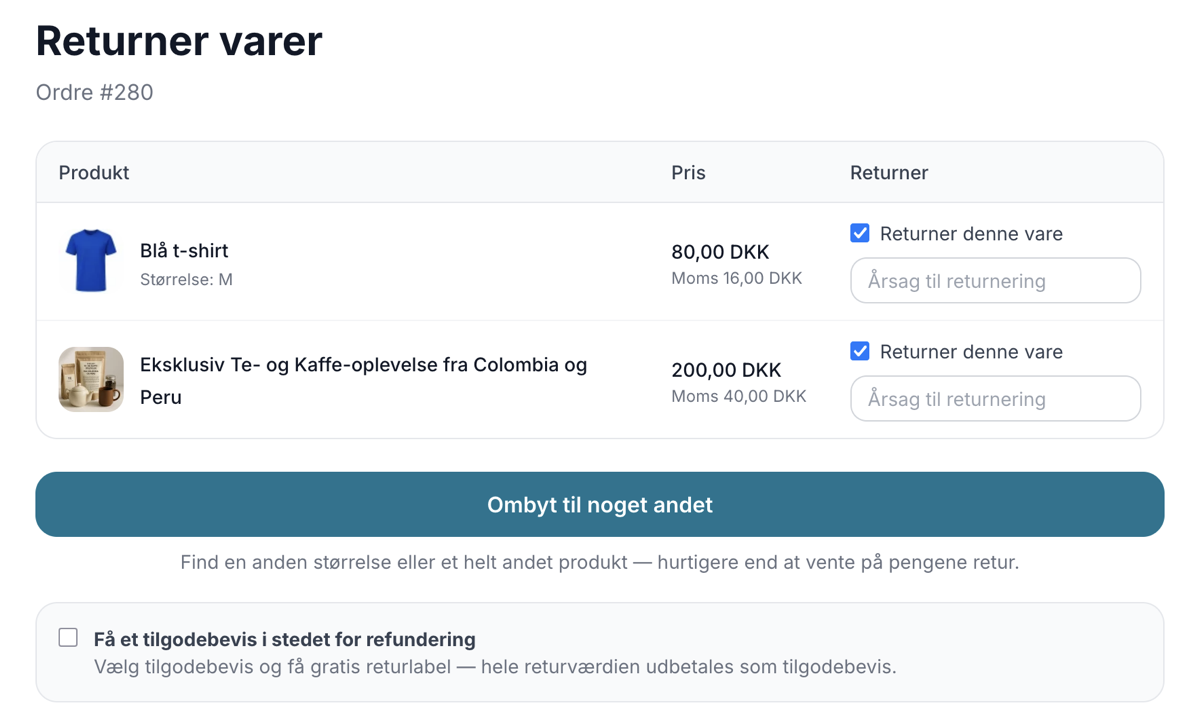
When a customer visits the returns page, they’ll see “Exchange for something else” as a highlighted button. If the customer would rather have a refund, that option is still available, and the customer can also choose a store credit instead of a refund. It’s up to the customer.
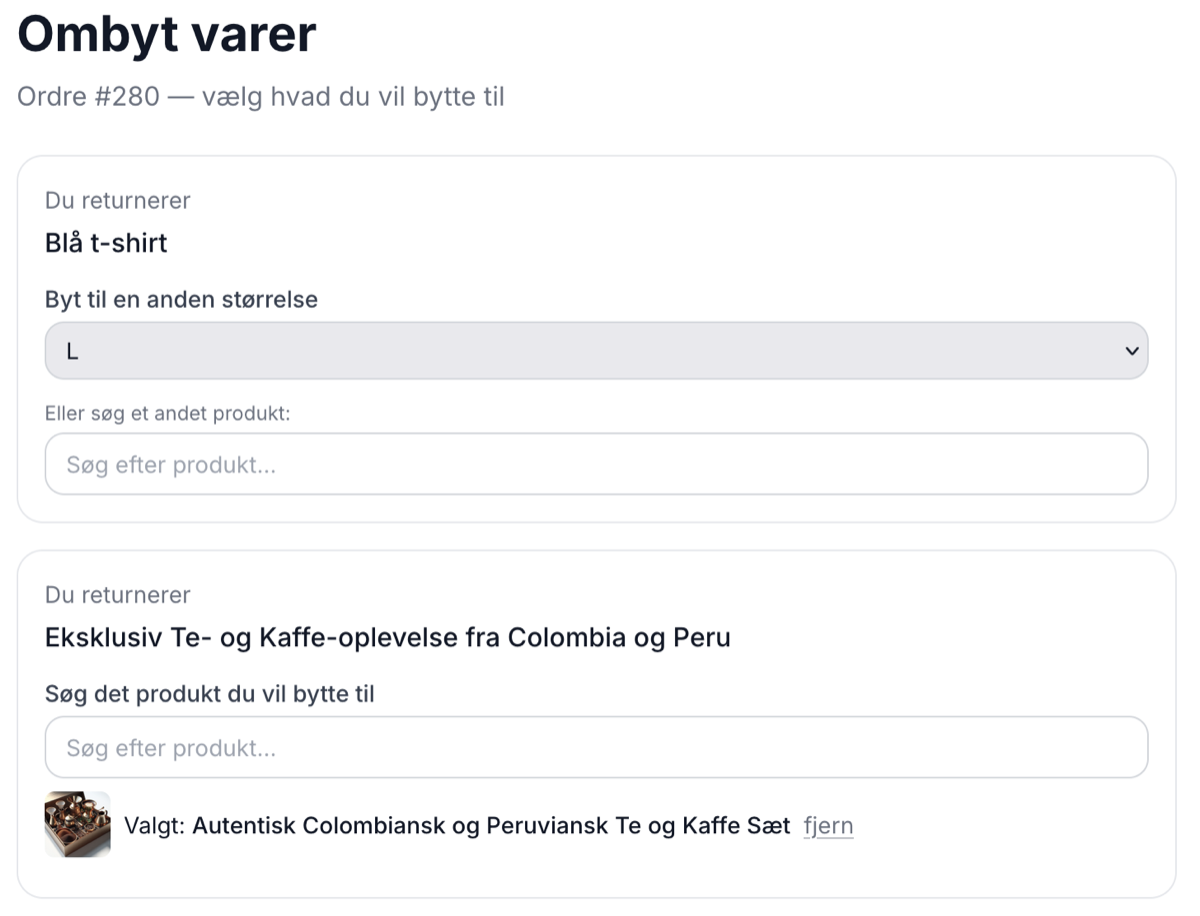
If the customer chooses to exchange an item, an exchange wizard opens. Here, the customer reviews each individual item and has two options:
- Exchange for a different size. A dropdown menu displays the sizes of the same product that are actually in stock. This is the completely frictionless route: the customer simply clicks from “small” to “medium,” and it’s done. No new search, no hesitation.
- Search for a completely different product. If the customer wants something entirely different, there’s a live search with images, making it easy to find the right item.
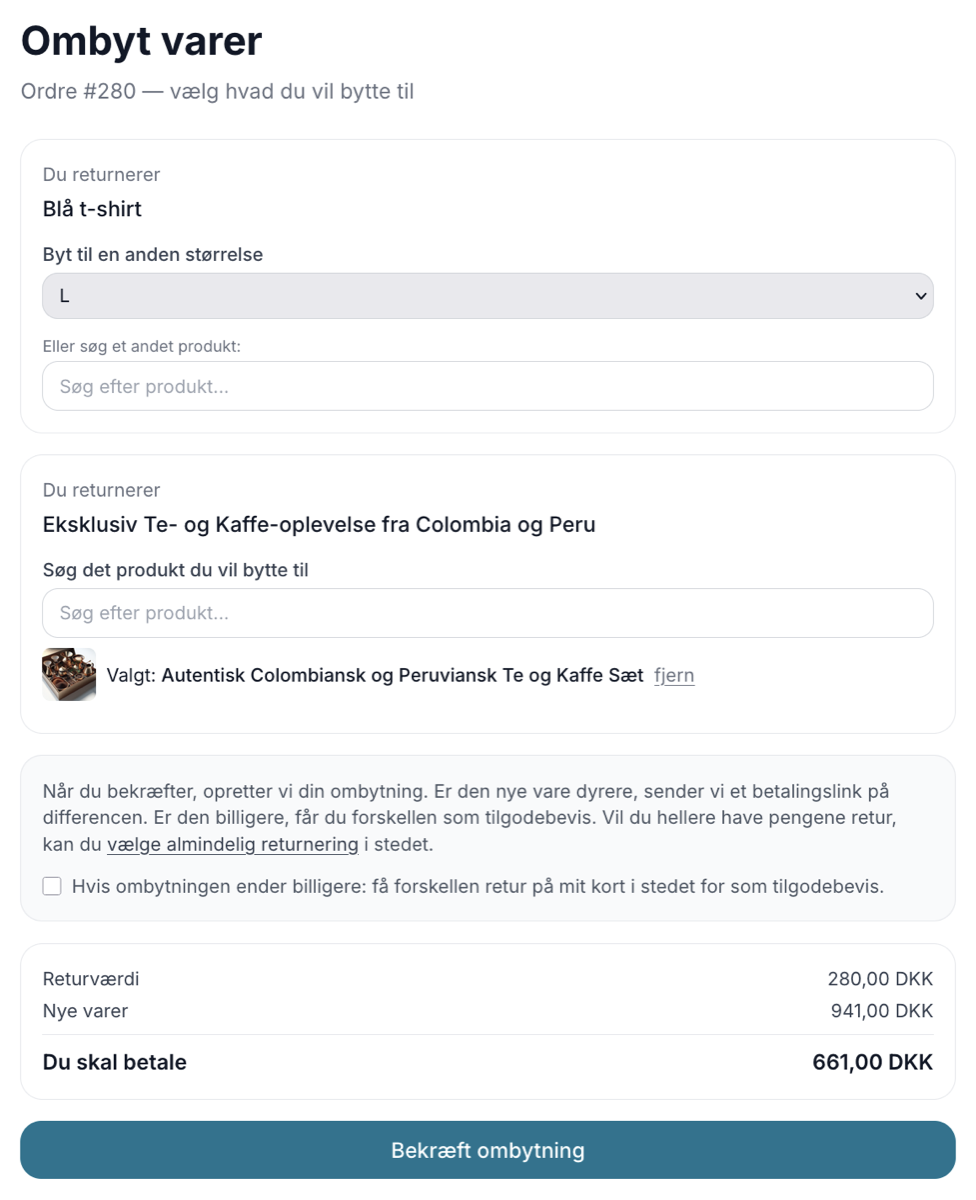
While the customer is making their selection, a live calculation runs continuously in the background. The customer can see in real time the return value of the items being exchanged, the price of the new items, and the final cost. The result is clearly displayed as either “You’ll pay X,” “You’ll get X back,” or “Even exchange.” There are no surprises at the end because the numbers are visible throughout the entire process.
The difference is handled automatically
This is typically where exchanges become cumbersome in other solutions, because someone has to manually send an invoice or issue a credit memo. You don’t have to deal with that. The system calculates the difference and chooses the correct course of action automatically.
- If the new item is more expensive: the customer receives a payment link for the difference, and the return amount is refunded to their card. The customer only pays the actual extra cost of the exchange.
- If the new item is cheaper: the new order is covered by the return, and the customer receives the surplus either as a store credit or as a refund to their card. The customer chooses.
- If it’s an even exchange: there’s nothing to settle, and the transaction is simply completed.
Simple accounting without any headaches
When you approve the exchange in the admin panel, Shoporama creates two separate documents: a credit memo for the returned items and a new order for the new items. This way, the accounting is automatically handled correctly. The old items are credited, the new ones are invoiced, and you don’t have to mess with the original order.
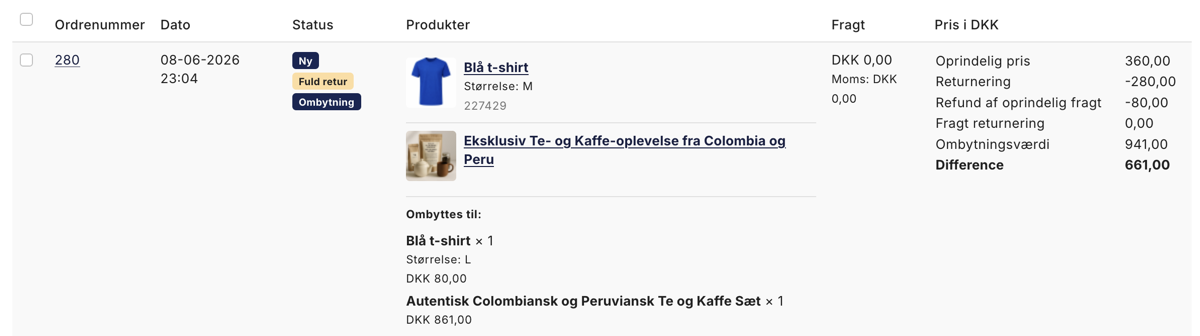
In the returns overview in the admin panel, an exchange is marked with its own “Exchange” label, so you can immediately see that it’s not a regular return. You’ll see the requested new items, the price difference, and you’ll have direct links to both the credit memo and the new order. Everything is all in one place.
The customer is kept informed every step of the way
Exchanges should feel reassuring for the customer, which is why Shoporama automatically sends the appropriate emails throughout the process. When the customer initiates the exchange, they receive a confirmation stating, “We’ve received your exchange request.” Once you approve it, the customer receives one of three emails depending on the outcome:
- A payment link if the new item is more expensive and a price difference needs to be paid.
- A confirmation stating “Your exchange has been completed” with a store credit if the new item is cheaper and the customer chose a store credit.
- A refund confirmation if the customer chose to have the difference refunded to their card instead.
How to Get Started
You can enable exchanges on the Returns Center page under Orders, Returns Center (at the bottom, in the settings). The Returns Center itself is activated under Webstore, General on the Returns Center tab. Once the feature is enabled, “Exchange for something else” will automatically appear on your returns page, and your customers can get started right away. You don’t need to change your products or inventory, because size exchanges are based directly on the variants and inventory you already have in your store.
Our recommendation: Turn it on and see how many “returns” were actually just customers who needed a different size. That’s revenue you would otherwise have lost.
Are you using your own theme?
If your online store runs on one of Shoporama’s built-in themes, such as Montana, the exchange button is already part of the theme, and you can start using the feature as soon as you enable it. If, on the other hand, you’re using your own custom theme, the code for exchanges must be implemented in the theme before your customers see the option on the returns page. It’s the same situation as with other new features: the standard themes include them automatically, while a custom theme only does so once the code has been integrated.
You have two easy options. You can download Montana for free from the theme library and copy the relevant code snippets into your own theme, allowing you to keep your design. Or you can have one of our design partners add the code for you, so it just works.
Frequently Asked Questions
I sell clothing and I’m not very tech-savvy. Do I have to set up anything complicated?
No. Just enable exchanges on the Returns Center page under Orders, Returns Center, and you’re all set. The customer chooses the new size or item themselves, and you simply approve it with a click when the package is returned.
I have a custom theme. Do I need to do anything special to make exchanges work?
Yes. On Shoporama’s built-in themes, such as Montana, the exchange button is already included, but with a custom theme, the code must be implemented in the theme before your customers see the option on the returns page. You can download Montana for free from the theme library and reuse the code, or get help from one of our design partners.
What should I do if the size the customer wants isn’t in stock?
That situation won’t arise, because the dropdown menu only shows the sizes that are actually in stock. Therefore, a customer can never exchange an item for one you don’t have. If there’s no suitable size, the customer can instead search for another product or choose a standard refund.
How is an exchange handled in the accounting system?
Two separate documents are created: a credit memo for the returned items and a new order for the new items. The old items are credited, and the new ones are invoiced, so the sales tax and bookkeeping are automatically handled correctly. The original order remains unchanged.
I run several stores and think in terms of time. How much manual work is actually involved?
Virtually none per case. The customer selects the new item and sees the difference themselves, and you approve it with a single click. The system automatically creates a credit memo, a new order, and either a payment link or a credit note, so you don’t have to do any manual invoicing.
What happens if the new item is more expensive than the one the customer is returning?
The customer automatically receives a payment link for the difference, and the return value is refunded to their card. This means the customer only pays the extra cost of the exchange, and you don’t need to send any invoices manually.
And if the new item is cheaper?
Then the new order is covered by the return, and the customer receives the surplus either as store credit or as a refund to their card. The customer chooses which of the two options they prefer.
I’m new to the job. How do I know if a case is an exchange and not a regular return?
In the returns overview in the admin panel, exchanges are clearly labeled “Exchange.” You can see which new items the customer wants, what the price difference is, and you have direct links to both the credit memo and the new order.
Is the customer notified along the way?
Yes. The customer receives an email when the exchange is created and another upon approval: either a payment link, a confirmation with a store credit, or a refund confirmation, depending on the outcome. The customer is kept informed every step of the way.
Related articles
Return center
Learn how to set up and use Shoporama's Return Center so your customers can easily request returns and you can handle them efficiently from...
Handle returns
Guide to Shoporama's returns center - handle returns, create credit notes, and manage customer return requests.
Gift cards and vouchers
Guide to creating and managing gift cards and vouchers in your Shoporama online store, including gift card products and discount codes.
Digital fortrydelse: lad kunderne fortryde købet online
Sådan virker den digitale fortrydelsesfunktion i Shoporama. Kunden fortryder købet online i to trin, du får besked, og ordren markeres automatisk.
More from the blog
Reviews with photos: Let customers show the product as it is
Now your customers can attach photos when they leave a review of their purchase. A photo of the product in use at a real customer’s home shows...
19. oktober 2026
Inventory Value with Split Inventory: One Number for the Financial Statements, Without Duplicates
If your shops sell from the same inventory, each shop displays the full value of the shared inventory, and if you combine the shops, the items are...
17. oktober 2026
Customer Club Newsletter: Sell More to Returning Customers
Your regular customers are the ones most likely to make repeat purchases. Now you can send the newsletter only to the customer club, to a specific...
14. oktober 2026