Most online stores guess their shipping rates. Should it be 39 kr or 19 kr? Should free shipping start at 399 kr or 499 kr? The discussion usually ends up being based on gut feelings, because no one can see what the other option would have yielded.
A split test of shipping rates replaces guesswork with an experiment. You choose one shipping method, set a new price, and let Shoporama show that price to half of your visitors, while the other half sees your current price. Afterward, you get a result in kroner.
What the feature does
A shipping test always has exactly two variants: “As is ” and “New shipping price.” Traffic is split 50/50 between them.
Each visitor is assigned one of the two variants and sees the same price throughout the entire process: on the product page, in the cart, at checkout, and if they return later. The assignment lasts for up to 30 days. The price of the order is exactly what the customer was shown. Even the free shipping banner in the cart—the one that says “Spend 120 kr more and get free shipping”—follows the variant’s threshold, so no one is promised one thing and charged for another.
The test only affects the shipping method you’ve selected. All your other delivery options remain unaffected, and subscription renewals and upsell orders always use the store’s standard prices.
Four steps, and you’re all set
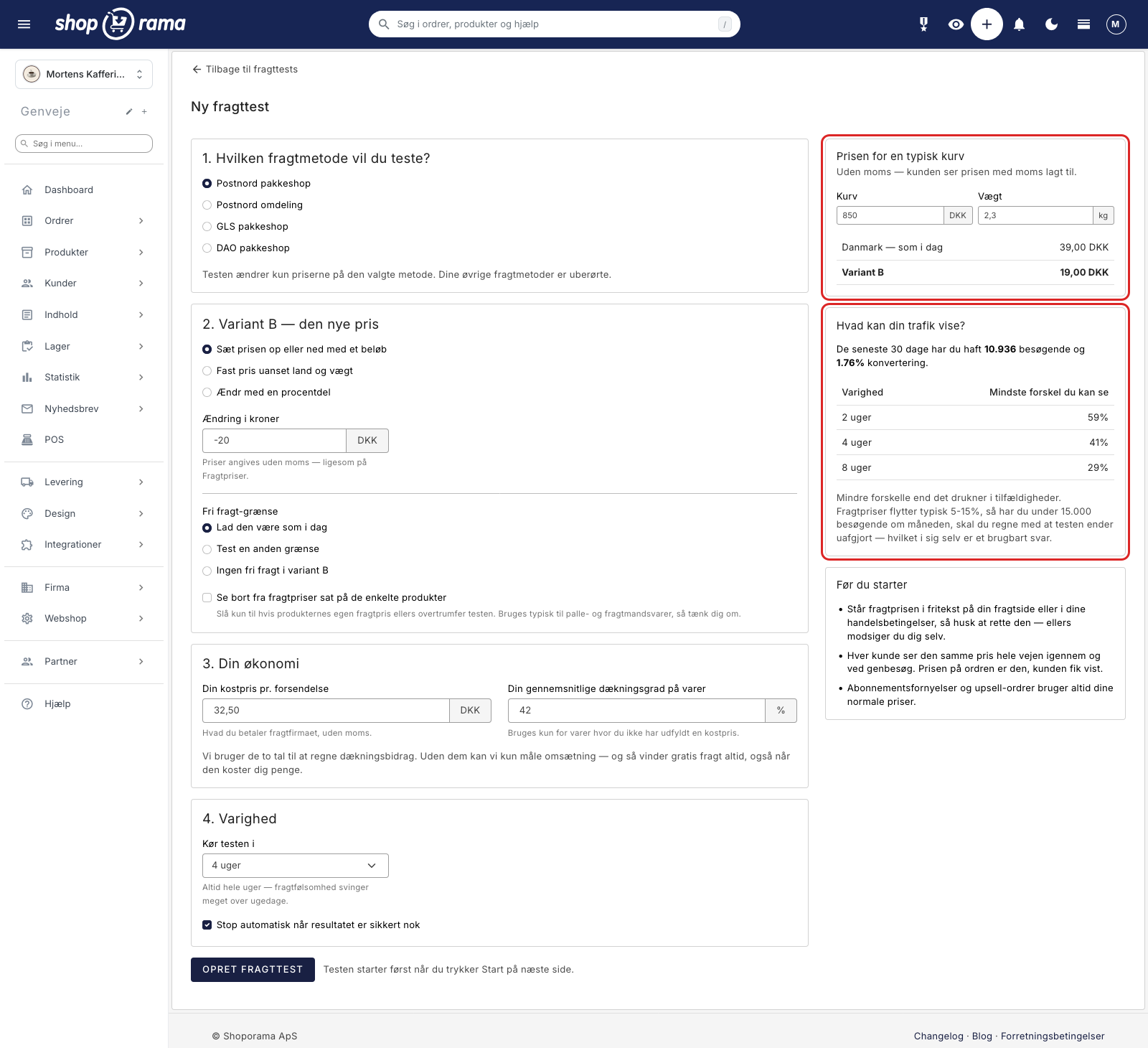
Setup consists of four steps: 1. Which shipping method do you want to test?, 2. Variant B, the new price, 3. Your finances, and 4. Duration. You don’t need to come up with a name during the process. The test is automatically named after the shipping method you’re testing—for example, PostNord—and you can rename it afterward under Settings on the test’s own page.
That’s why we measure contribution margin rather than conversion rate
This is the most important difference between a shipping test and a regular A/B test. Free shipping almost always wins in terms of conversion rate. It just almost always costs money because the store pays for shipping itself. If you measure revenue instead, you count the shipping costs you pay yourself as income.
That’s why a shipping test in Shoporama is determined by the contribution margin per visitor. We subtract your shipping expenses from your shipping revenue, add the contribution margin on the products, and divide by the number of visitors. The conversion rate and average order size are still displayed, but they do not determine the result.
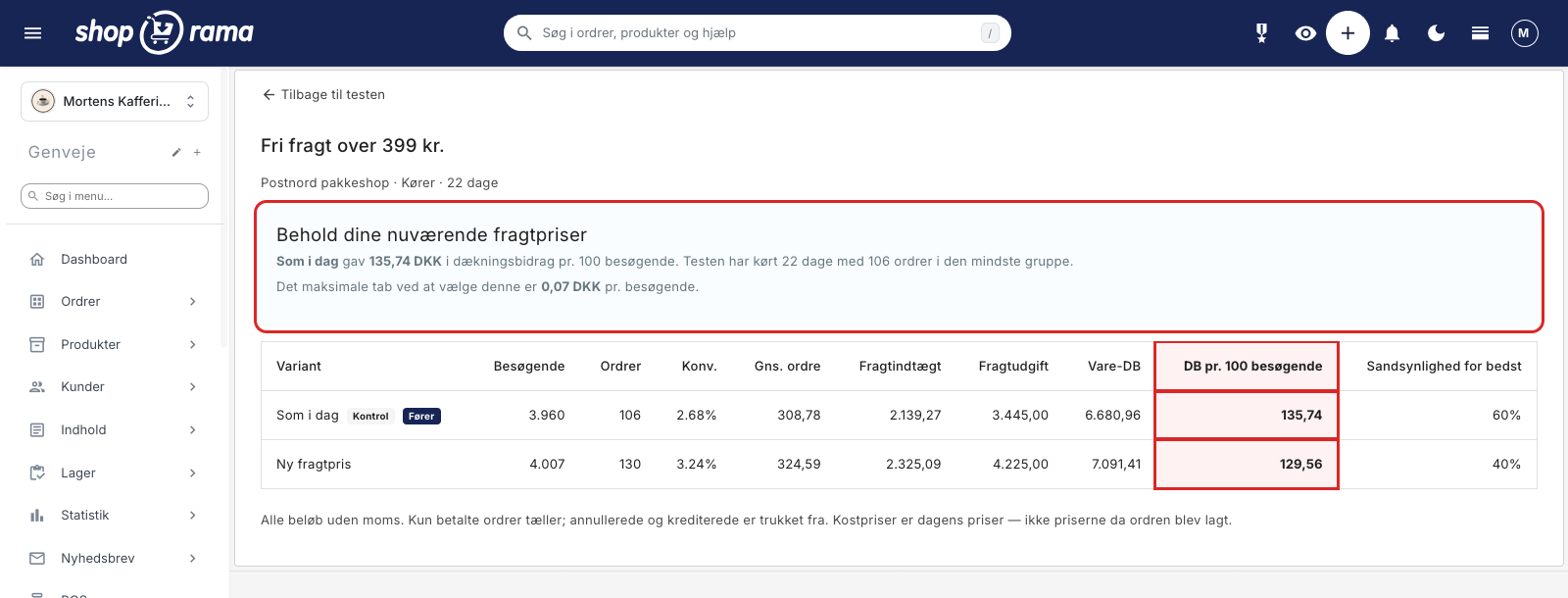
Only paid orders are counted. Canceled and credited orders are subtracted, so you see what you actually ended up with.
Be honest about what your traffic can support
Most testing tools promise you a definitive answer. This one doesn’t—and that’s by design.
As soon as you set up the test, the screen shows how many visitors and what conversion rate you’ve had over the past 30 days, and how much of a difference your traffic can realistically make after 2, 4, and 8 weeks. If you have fewer than 15,000 visitors per month, it’s clear as day: shipping rates typically fluctuate by 5 to 15%, so you should expect the test to end in a tie.
A tie is also a useful result. It means the difference is so small that you can confidently choose the solution that best suits your store, rather than spending more time on the question.
Once the test is complete, you won’t get a statistical formula, but a specific amount: “The maximum loss from choosing this option is 0.07 kr per visitor.” This isn’t a guaranteed upper limit, but rather the average loss you can expect per visitor if you choose this option and it turns out not to be the best one. If the result isn’t certain yet, the report indicates how far along the test is, for example: “The test has run for 12 of at least 14 days. The smallest group has 63 orders (target: 100).”
A winner is declared only when the test has run for at least 14 days, has at least 100 orders in each variant, and the expected loss from choosing it is no more than 10 øre per visitor. The report also warns you against the classic pitfall: if you look at the numbers every day and stop when things look good, you’ll find a winner almost every time—even when there isn’t one.
What You Can Test
- Increase or decrease the shipping price by a certain amount, for example, 20 kr less.
- Try a flat rate regardless of country and weight, for example, 0 kr.
- Change the price by a percentage, for example, 15% lower.
- Test your shipping price per country and your weight ranges all at once. The adjustment applies to all prices for the selected method.
- Change your free shipping threshold, or try eliminating free shipping entirely. You can also test the threshold on its own and leave the price unchanged.
While you’re setting up the test, a live preview shows what a typical cart costs under both options. Just enter a cart total and a weight, and you’ll immediately see “Denmark, currently 39.00 DKK” compared to “New shipping price 19.00 DKK.” All prices are listed excluding VAT, just like on the shipping rates page.
You decide what happens next
The checkbox “Stop automatically when the result is reliable enough” is enabled by default. This means the test stops on its own, either when the result is reliable enough or when the end date is reached. Prices are never changed when the test stops. You’ll receive a notification in the admin panel to open the test and view the results, and then you can decide for yourself. If you’d rather let the test run for the entire period no matter what, simply uncheck the box.
Shoporama never changes your prices on its own—not even when the test ends, and not even when there’s a clear winner. Prices are only changed when you click “Activate Permanently,” and your old prices are saved so that a “Cancel” button can revert everything: the price per country, the weight ranges, and the free shipping threshold.
Once you’ve activated the new prices, the test can neither be restarted nor deleted. This is intentional: the test is the only place where your old prices are stored, so if it could be deleted, the undo option would disappear along with it.
You can stop a test at any time, and stopping a test never changes the prices. If the test is stopped without a definitive result, the “Choose Yourself” box appears, so you can still activate the new price if it best suits your store.
What You Need to Know First
- If the shipping price is listed as free text on your shipping page or in your terms of service, it must be corrected. Otherwise, the store will contradict itself while the test is running.
- Only one shipping test can run at a time, and it covers only one shipping method. You can prepare the next one in the meantime.
- While the test is running, the static page cache is disabled, so pages load slightly slower than usual. It will return to normal once the test is stopped.
- Search engines and bots always see your current prices and are not included in the statistics.
- The report will alert you if traffic is unevenly distributed between the two variants, so you don’t draw a conclusion based on skewed data.
- If the test has been running for a long time without reaching a conclusion, the report will state clearly that the difference is small enough for you to safely make your own choice.
- The pricing configuration is locked once the test has started: shipping method, variant B, free shipping threshold, cost price, and coverage ratio. This is because the numbers are specific to that particular configuration. You can still change the name, duration, and the “auto-stop” checkbox along the way, and an ongoing test can be extended.
You must specify your cost per shipment and your average gross margin on the items for the calculations to work out. If cost data is missing for more than 20% of revenue, the report will indicate this and use the estimated gross margin for the remainder.
Get Started
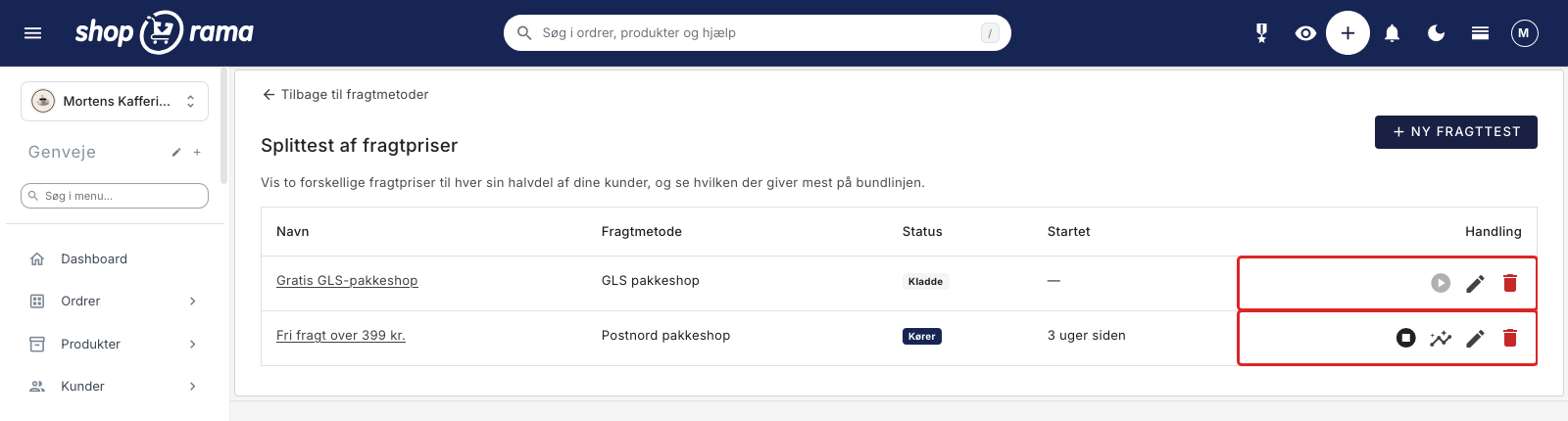
You’ll find the feature under Delivery > Split Test Shipping Rates, and there’s a shortcut via the “Split Test Shipping Rates” button under Delivery > Shipping Methods. A test is always created as a draft, so you can finish setting it up at your own pace and only click “Start” when you’re ready.
See the step-by-step guide to Split Testing Shipping Rates. If you need to set up the basics first, read about creating a new shipping option, weight-based shipping rates, shipping rates by country, and countries and currencies. If you want to see the results afterward, you’ll find them in the shipping statistics and in the shipping section of the checkout flow. If you have any questions, please email support@shoporama.dk.