What does “online store with Claude” mean?
Claude is an AI assistant from Anthropic. It works in the same way as ChatGPT, but is known for being particularly good at complex tasks and understanding nuances in Danish. With Shoporama’s built-in connection, Claude gets direct access to your online store and can both read data and perform actions. Shoporama is approved and listed in Claude’s connector library, so you can connect your store with just a few clicks right inside Claude.
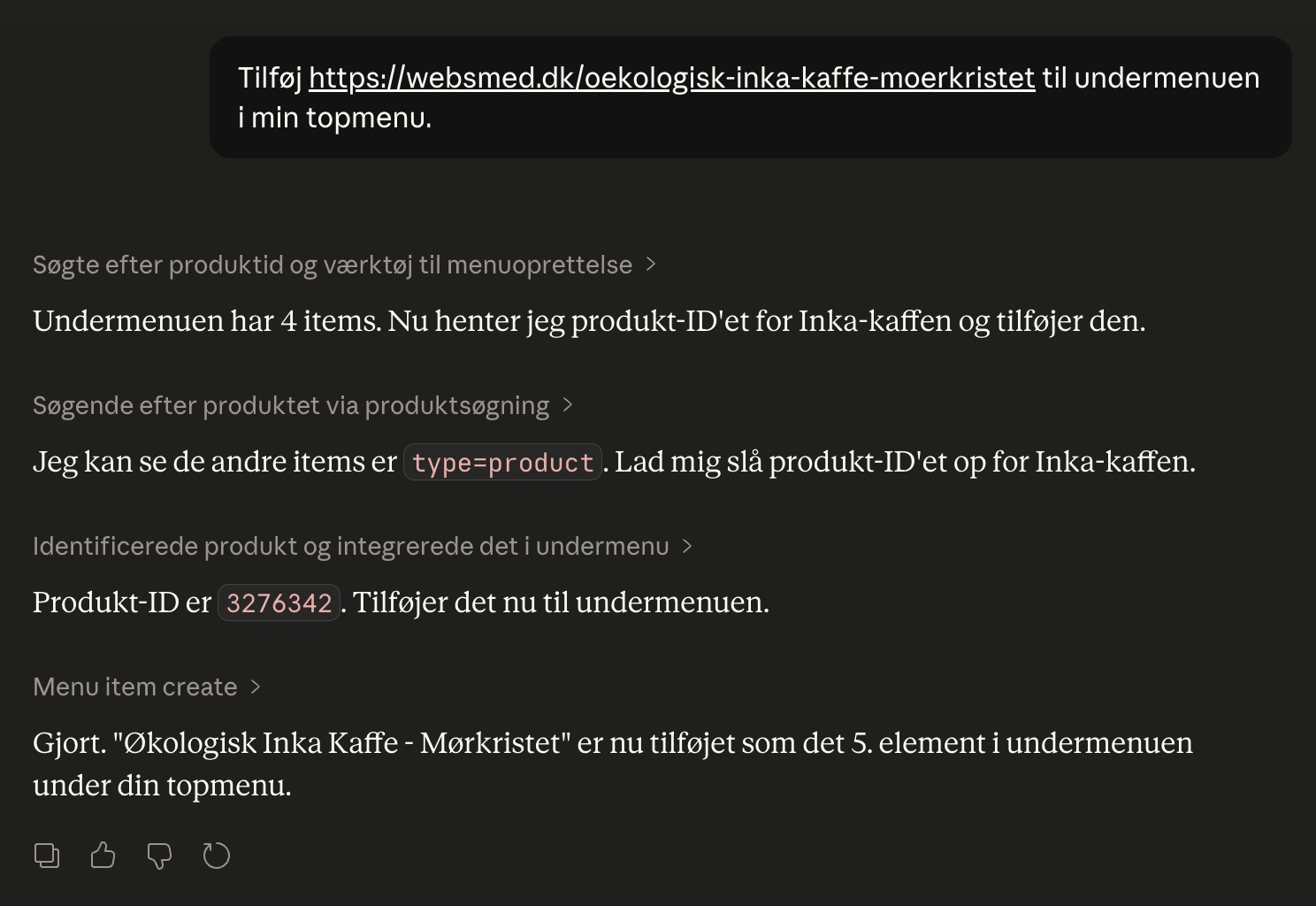
Just type in Danish what you want done—for example , “create a 15% discount code called PÅSKE26 that expires on March 31”—and Claude will handle the rest in your shop. Claude has over 200 tools to work with, and they cover most of what you’d normally do in the admin panel: products, inventory, orders, customers, campaigns, newsletters, pages, blog, design, shipping, analytics, SEO, and operations.
The connection is based on an open standard called MCP (Model Context Protocol). This means that Claude isn’t the only one that works. Other AI clients that support MCP can also be connected. But right now, Claude is the easiest to set up and the one that delivers the best results in Danish.
What can you ask Claude to do?
Here are some of the most common things store owners ask Claude to do on a daily basis. This list isn’t exhaustive. Claude has over 200 tools, and you’ll quickly discover that “Can Claude also…?” almost always turns into “yes.”
| Area | Example prompt |
|---|---|
| Sales and Statistics | "How much have I sold this month compared to last month?" "Show me my 10 best-selling products over the last 30 days" "What was my profit margin in August, and which products are missing their cost price?" |
| Products and Categories | "Set the price of the black wool hat to 399 kr" "Create 5 new products based on this supplier PDF" "Create the product based on the three images I’ve attached" "Find all products without an image" "Move all products from Summer Sale to Outlet" |
| Orders, Inventory, and Shipping | "Mark all orders that are ready as shipped" "Which items should I reorder so I have enough inventory for 30 days?" "Move 20 black wool hats from the warehouse to the store" "Set shipping to Norway to 80 kr. with PostNord" |
| Promotions and discount codes | "Create a 10% discount code called SOMMER26 that expires on June 30" "Create a promotion: Buy three items in the Coffee category and get the cheapest one for free" "Create a 500 kr gift card that can only be used once" |
| Homepage and Design | "Add a newsletter module at the bottom of the homepage" "Change the primary color of the theme to dark blue" "Add a hero banner with the text 'Spring Sale' at the top of the homepage" |
| Content | "Write a blog post about our new Colombian coffee beans and publish it" "Translate our 'About Us' page into English" "Create a landing page for the spring sale featuring 5 of our best products" |
| SEO and Operations | "Identify the 10 products with the lowest SEO scores and suggest what needs to be fixed" "Which keywords have returned 0 results in the last month?" "Which 404 errors should I set up redirects for?" "Generate a shipping label for order 1076" |
And you can combine these tasks. "Find the 10 best-selling products from last month, create a 15% off campaign for them, and write a blog post announcing the campaign." Claude handles it all in a single, seamless conversation.
You don’t always have to write the prompts yourself, either. Shoporama provides Claude with five pre-written prompts: Weekly Report, Purchasing Suggestions, Month-End Closing, Discontinued Items, and Searches with No Results. They only scan the store and make suggestions—and nothing is changed until you ask them to. Learn more in Statistics and Reports with Claude.
How to get started in just a few minutes
You’ll need a Claude account (free to create at claude.ai) and your Shoporama admin login. Since Shoporama is in Claude’s connector library, there’s no URL to copy. Just find Shoporama and click Connect:
- Open Shoporama in Claude’s connector library. You can also find the library within Claude under Customize → Connectors, where you click +, search for Shoporama, and click on it.
- Click Connect.
- Claude opens the Shoporama login page. Log in with your Shoporama account.
- Select which shop Claude is allowed to work in. If you want Claude to be able to make changes in the shop, select the “Full” access level.
- Click Authorize Access.
You’re all set. Open a new chat and try the first prompt: “Show me the 10 most recent orders.” It works on claude.ai in the browser, in Claude Desktop, and in the Claude app on your phone. You can also connect directly from the app on your phone. Anthropic still considers this feature to be in beta.
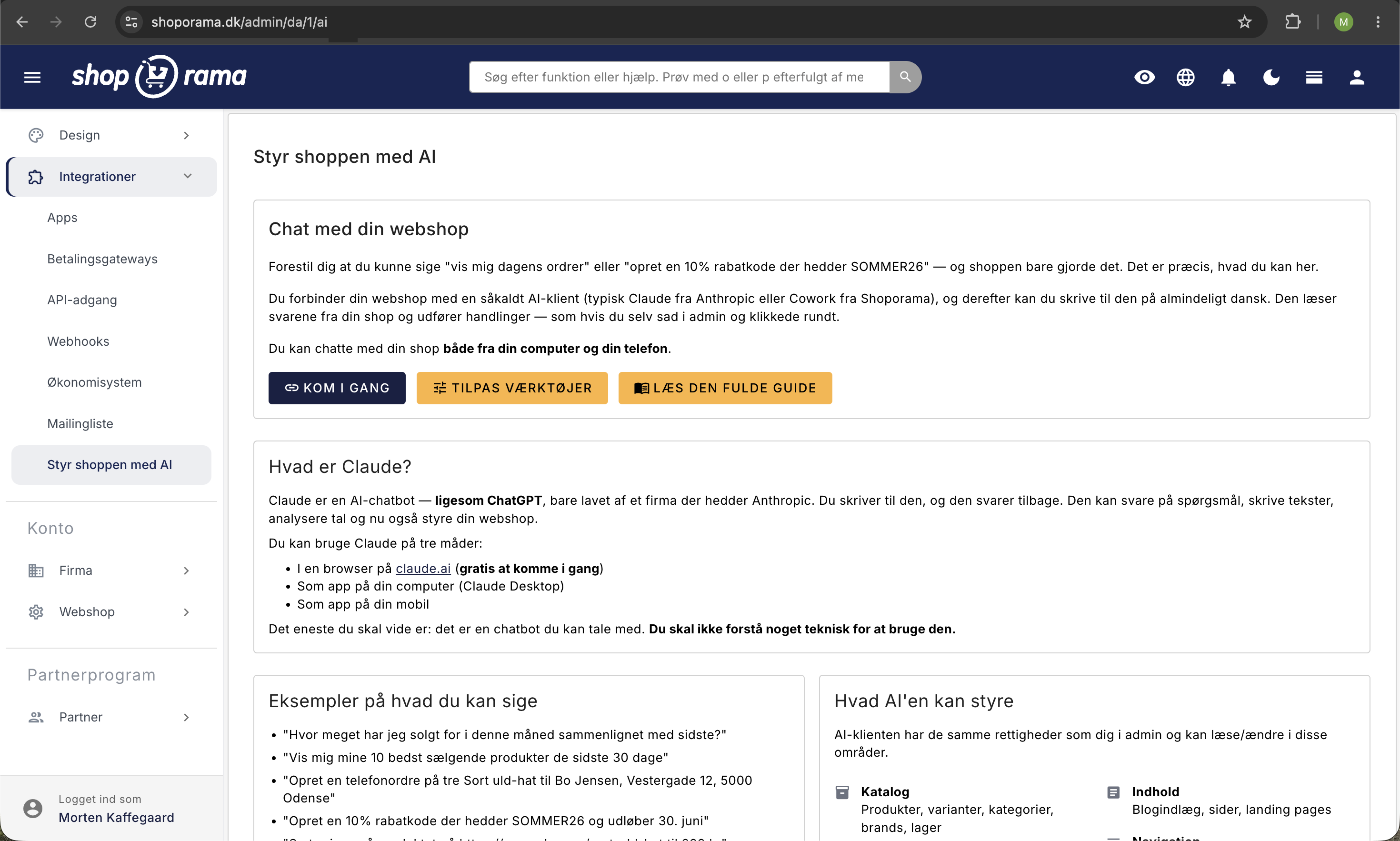
Do you have multiple shops? The connection from the library covers one shop per Claude account. You connect the first shop from the library. You add each additional shop as a custom connector in Claude using the shop’s own MCP URL, which you’ll find in the admin panel under Integrations › Manage the shop with AI › Get Started. On Claude’s free plan, you can have one custom connector. If you’re using Team or Enterprise, an owner must add the custom connector. Read how in the support article “Manage Your Store with AI.”
Online Store with Claude vs. Online Store with REST API
Shoporama has had a REST API for many years. It’s still there and is used by thousands of integrations, such as Shipmondo, e-conomic, Klaviyo, and ERP systems. The difference between the two approaches:
| With Claude (MCP) | With the REST API | |
|---|---|---|
| Level of Difficulty | You write in Danish | You write code (PHP, Python, JS, etc.) |
| Setup | Find Shoporama in the Claude library, and click Connect | API token, Postman/Swagger, coding |
| Maintenance | None—Claude adapts automatically | You keep your integration running |
| Best for | Daily operations, experiments, ad hoc tasks | Fixed integrations (ERP, inventory, accounting) |
| Security | OAuth 2.0 + PKCE | Bearer token |
| Audit | Built-in 90-day log | You implement logging yourself |
The two are not mutually exclusive. Most online stores use Claude for day-to-day operations and quick experiments, and the classic REST API for the fixed integrations that need to run stably year after year.
Security and Control
“Should I really give an AI access to my online store?” is a fair question. Here’s what you need to know:
- Claude can never do more than you can. It can’t do anything you can’t do yourself in the admin panel, and only users with the “Full Access” role can connect it. There are some things it simply can’t do, such as changing the currency, domain, or payment settings.
- You control access on a per-area basis. For each area—such as Orders, Theme and CSS, or Statistics—you can choose Read & Edit, Read Only, or Off. In Read Only mode, Claude can view data and answer questions, but cannot make any changes.
- You can require approval. If you enable Extra Security, Claude won’t make changes that send emails to customers, transfer funds, permanently delete anything, or change multiple things at once. These changes will be pending your approval in the admin panel. Read more in “Extra Security: Approve Changes from Claude.”
- You choose which store Claude is allowed to work in. If you have multiple stores on your account, Claude will only have access to the one you approve.
- Everything is logged, and many actions can be undone. Every time Claude makes a change in your store, it’s recorded in an audit log that you can view yourself: what was done, when, and whether it succeeded, was rejected, or is awaiting approval. You can undo changes to theme settings, shipping rates, online store settings, and the stylesheet using the “Undo” button, as long as no one has changed them again since then. The log is stored for 90 days.
- Limit on the number of changes. Claude can make a maximum of 120 changes per minute and 3,000 per hour per connection, so a session that gets out of control is stopped in time.
- OAuth 2.0 + PKCE. The connection is secured using the same protocol as major banks and Google. No API keys are stored in plain text anywhere.
- You can revoke access at any time. One click in the admin panel, and the old connection is terminated.
- Take a backup before making major changes. If Claude needs to clean up hundreds of products or change critical settings, take a backup first—just as you would before any major manual intervention.
Does this also work with ChatGPT, Cursor, and other AIs?
Shoporama’s connection uses an open standard called the Model Context Protocol (MCP). This means it’s not just Claude that can be connected. Other MCP-compatible AI clients also work:
- Claude Desktop and claude.ai in the browser: the easiest way, because Shoporama is in Claude’s connector library
- Claude in the mobile app: you can connect from the app’s library (beta at Anthropic), and a connection you’ve set up on your computer will also work in the app
- Cursor: a popular AI code editor that can also manage web shops via MCP
- Cline, Goose, and Cowork: other MCP-compatible clients
- ChatGPT: Partially supports MCP via Custom Connectors (under development)
Right now, Claude is the easiest to set up and the one that best understands Danish. We recommend starting there. As the MCP ecosystem matures, you’ll be able to switch clients without changing anything in your store.
How much does it cost?
The connection between Shoporama and Claude is free and included in all Shoporama subscriptions. There’s no extra license fee, no per-user charge, and no usage-based billing on our end.
Claude itself has a free tier at Anthropic that you can start with, and Shoporama from the library also works on the free plan. If you use the AI intensively, you can upgrade to a paid plan directly through Anthropic. That’s their price and their bill. Shoporama isn’t involved.
Check out Shoporama’s pricing for the webshop platform itself. You can try it all for free for 30 days without a credit card.
Ready to give it a try?
The fastest way to understand the value is to try it yourself. Create a Shoporama store, log in, and tackle a small task you’ve been putting off: “Find the 10 products with the most views but the fewest sales, and suggest what I can do.”
Start your free 30-day trial. No credit card, no commitment, and you’ll be connected to Claude from day one. You’ll have an online store up and running in under an hour, and your new AI assistant will be ready to go right away.
Frequently Asked Questions
What’s the difference between Claude and Shoporama’s built-in AI copywriter?
The built-in AI only helps with writing text in the editor, such as product descriptions, blog posts, and meta descriptions. Claude, on the other hand, can manage the entire store: create products, run campaigns, edit the homepage, retrieve sales figures, and much more. The two are not mutually exclusive and can be used side by side.
Is it safe to give Claude access to my online store?
Yes. Claude can never do more than the user who connects it, and you decide for each area whether Claude can read and edit, read only, or have no access at all. With Extra Security enabled, changes that could have unintended consequences will require your approval. Access is secured via OAuth 2.0; you choose which store it can operate in, everything is logged in an audit log that you can view, and you can revoke access at any time.
What happens if Claude misunderstands something and makes a mistake?
That can happen, which is why we recommend asking Claude to confirm important changes before they’re made—especially for deletions and bulk updates. If you enable Extra Security, changes that send emails, transfer funds, permanently delete data, or modify multiple items at once will require your approval. The audit log shows exactly what was changed. You can undo changes to theme settings, shipping rates, online store settings, and the stylesheet with a single click in the log, and you can correct everything else in the admin panel. Always back up critical data before making major changes via AI.
Can I use ChatGPT or another AI instead of Claude?
The connection uses the open standard MCP (Model Context Protocol), so other MCP clients such as Cursor, Cline, Goose, and Cowork can also be connected. ChatGPT partially supports MCP via Custom Connectors. Right now, Claude is the easiest to set up and the one that best understands Danish.
Is my customers’ data sent to Anthropic when I use Claude?
When you ask Claude for something involving customer data (e.g. , “show today’s orders”), the relevant information is sent to Claude as part of the conversation, just as when you use another AI chatbot. Anthropic does not, as a rule, use the chat to train AI models. Check their privacy policy for details.
Do I need to be a tech expert to use Webshop with Claude?
No. You don’t need to know how to code, understand APIs, or know JSON. You create a Claude account, find Shoporama in Claude’s connector library, click “Connect,” and log in with your Shoporama account. There’s no URL to copy, and it takes just a few minutes.
Does it work on mobile, too?
Yes. You can connect Shoporama from the connector library directly in the Claude app on your phone (Anthropic still calls it beta), and if you’ve connected from a computer, the connection will also work in the app. However, additional shops connected as custom connectors must be added from a browser or Claude Desktop. You can manage your shop from a café, on the train, or from your couch without opening the admin panel. You can also take a photo of a new item with your phone, attach it to the chat, and ask Claude to create the product using the photo. This requires that you grant permission once for “www.shoporama.dk” in Claude’s settings, which you can do at claude.ai in a browser or in Claude Desktop. Read more in “Photos from Claude.”
Can multiple employees connect their own Claude accounts to the same store?
Yes, if they have the “Full Access” role in the shop. Each employee can connect their own Claude account to the shop, and each connection receives its own OAuth token, so access can be revoked for each individual employee. Users with a different role—such as Employee, Marketing, or Developer—and users restricted to specific categories cannot use Claude because the connection applies across the entire store. If an employee is assigned a role other than Full Access after the connection has been established, Claude’s actions will be rejected from that point on. If you remove an employee from the store, all of their logins via “Sign in with Shoporama”—i.e., Claude, the POS app, and the scanner app—will stop. Read more in Roles and Permissions.
Is there an additional cost beyond my Shoporama subscription?
The connection between Shoporama and Claude is free and included in the subscription. Claude offers a free tier at Anthropic that you can start with. If you use it extensively, you can upgrade directly through Anthropic. Shoporama does not charge extra for this.
Does it work on the free Claude plan?
Yes. Shoporama from Claude’s connector library can be used on all Claude plans, including the free one. On the free plan, however, you can only have one custom connector, so you can connect a maximum of two shops: one from the library and one as a custom connector. If you’re using Claude on a Team or Enterprise plan, an owner of your Claude organization must first enable connectors.
What happens if I change my mind and want to revoke access?
You can revoke access at any time in your Shoporama admin under Integrations › API Access, where you delete the row whose name begins with OAuth:. The old connection will then no longer work. If you want to reconnect later, simply reconnect in Claude.
Can I turn off some of the AI tools if Claude hits the “context limit”?
Yes. In the admin panel under Manage the Shop with AI › Customize Tools, you can set entire sections to Off, such as Theme and CSS, Page Designer, or Newsletter. If a section is set to Read-Only, only the tools that read data will be loaded. This reduces the number of tools Claude loads at startup and frees up more space for the conversation itself. Read the guide “Customize Which Tools Claude Can Use.”
What happens if Claude tries to use a tool I’ve disabled?
The call is blocked on the server, Claude receives a clear error message, and the attempt is logged as “Rejected” in the audit log. The same applies if Claude tries to make changes in an area marked as “Read-only.” Your selections act as a real security barrier on top of your standard API permissions.
Also check out our in-depth guide to “Manage Your Store with AI,” our blog post on MCP and AI in online stores, or take a look at the REST API if you prefer a code-based integration.