Why Start an Online Rental Store?
If you rent out items, you’re probably familiar with the daily routine. A customer calls and asks if the party tent is available on the 12th. You check a spreadsheet or the calendar on the wall, reply to an email about the draft beer system, and enter the booking once the customer has confirmed. It takes time, even in the evenings and on weekends, and it’s easy to overlook a booking that came in through another channel.
The most costly mistake is a double booking. If two customers have been promised the same tent for the same Saturday, you’re left with a disappointed customer and maybe a party without a tent. And the more items you rent out, the harder it becomes to keep track of what’s out, what’s coming back, and what’s actually available.
How rentals work in Shoporama
In Shoporama, rentals are part of the online store itself. You enable “Rental” on a product profile, and all products in that profile become rental items. The product price is the price per day, and the stock quantity is the number of units you own. A rental never reduces your inventory. The units are reserved for the rental period and become available again afterward.
Shoporama calculates availability on a day-by-day basis. The available units for a given period are your total units minus the highest number rented out on any single day during that period. For example: You have 2 tents. One is rented from Monday to Tuesday, and the other from Thursday to Friday. There is never more than one tent out at a time, so there is still one available from Monday through Friday, and a third customer can rent it for the entire week. In a spreadsheet with one row per tent, it’s easy to miscalculate this.
The customer pays as with a regular purchase, and the booking becomes a standard order with the rental period listed on the line. The amount is charged immediately so that a booking made several weeks in advance doesn’t lose its reservation on the card before the tent is due to be rented out. You can turn this off in your profile. If you cancel the order, the units become available again.
Who is this for?
Rental in Shoporama is designed for items rented out by the day. It’s suitable, for example, for these types of businesses:
Party rentals
Tents, beer dispensers, tables, chairs, and other items for parties and events. The customer finds everything in the online store, selects the dates, and pays, and you can see from the list of today’s rentals what needs to be loaded into the car.
Trailer rental
A trailer can be rented for as little as one day, and with a minimum rental period, you can require, for example, a two-day rental. If you have multiple trailers of the same type, the “stock” count is the number of trailers.
Tools and Machinery
Drills, tile cutters, floor sanders, and other equipment available for rent by the day or weekend. If a machine comes in multiple sizes, you can create size variants, each with its own quantity and price.
Stores that both sell and rent
If you also sell general merchandise, sales and rentals are handled through the same online store and the same shopping cart. A wine shop can rent out draft beer systems and sell mugs and kegs in the same order, and a hardware store can rent out tools alongside the rest of its product lineup.
If you rent items by the hour—for example, a car for a three-hour move—or if you sell time slots for classes or treatments, that’s not what the rental feature is designed for. Rentals in Shoporama are always calculated in full days.
How the customer books online
- The customer finds the product. The price is listed per day, and on the product cards in the categories, there is a “Select Dates” button instead of “Add to Cart.”
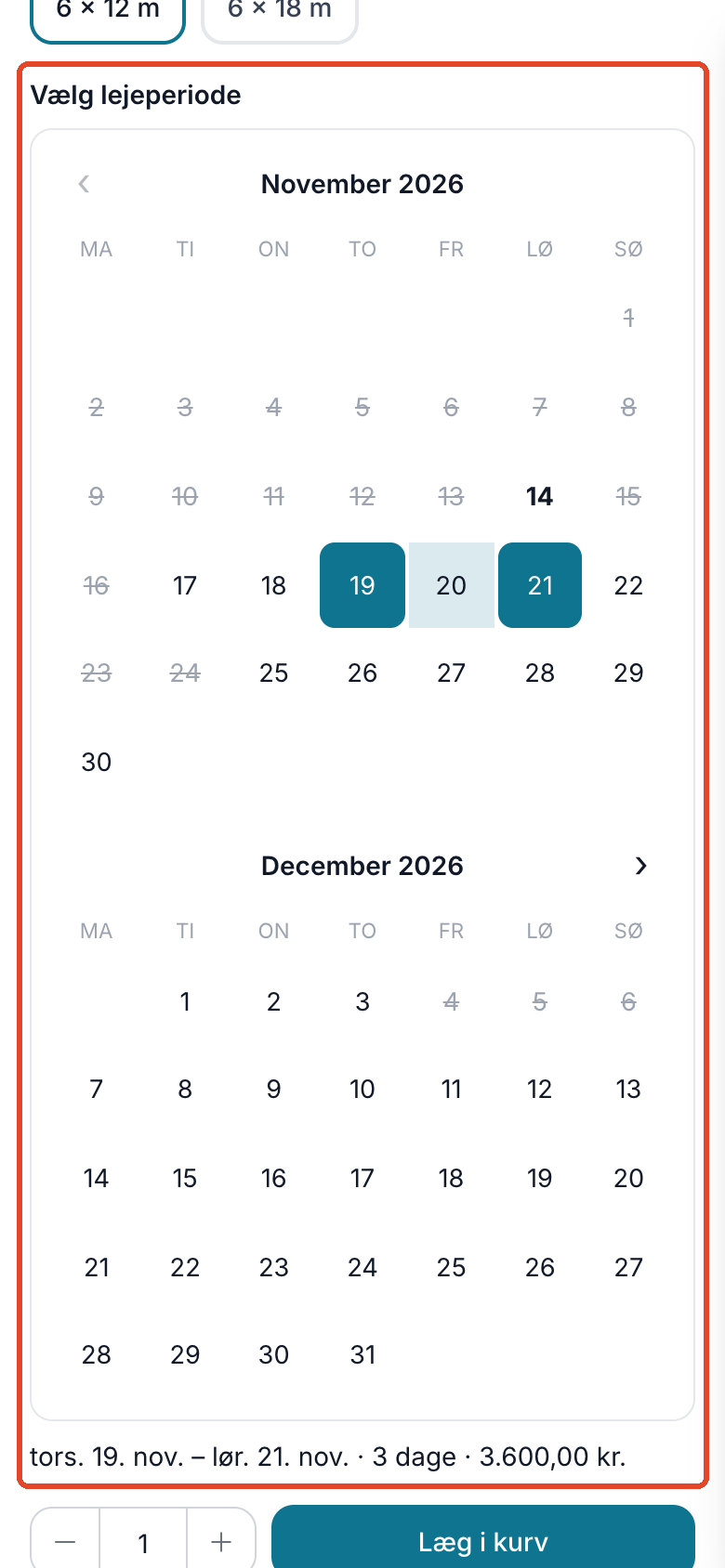
- The customer selects the period. Under “Select Rental Period,” there’s a two-month calendar where days prior to today and booked days are crossed out. The customer clicks on the first day and then on the last day. If the product has variants—such as tent size—the calendar updates when the customer selects one.
- The customer sees the price. Below the calendar, the period, number of days, and price for the entire period are displayed, e.g., Thu, Nov. 19 – Sat, Nov. 21 · 3 days · 3,600.00 DKK. If the period is shorter than your minimum rental period, or if there aren’t enough units available for the selected number, it will be indicated right there.
- The customer adds the item to the cart and pays. The rental period is checked again when the item is added to the cart. The rental period is listed in the cart, at checkout, in the order confirmation, and on the invoice.
Manage check-outs and returns from a single list
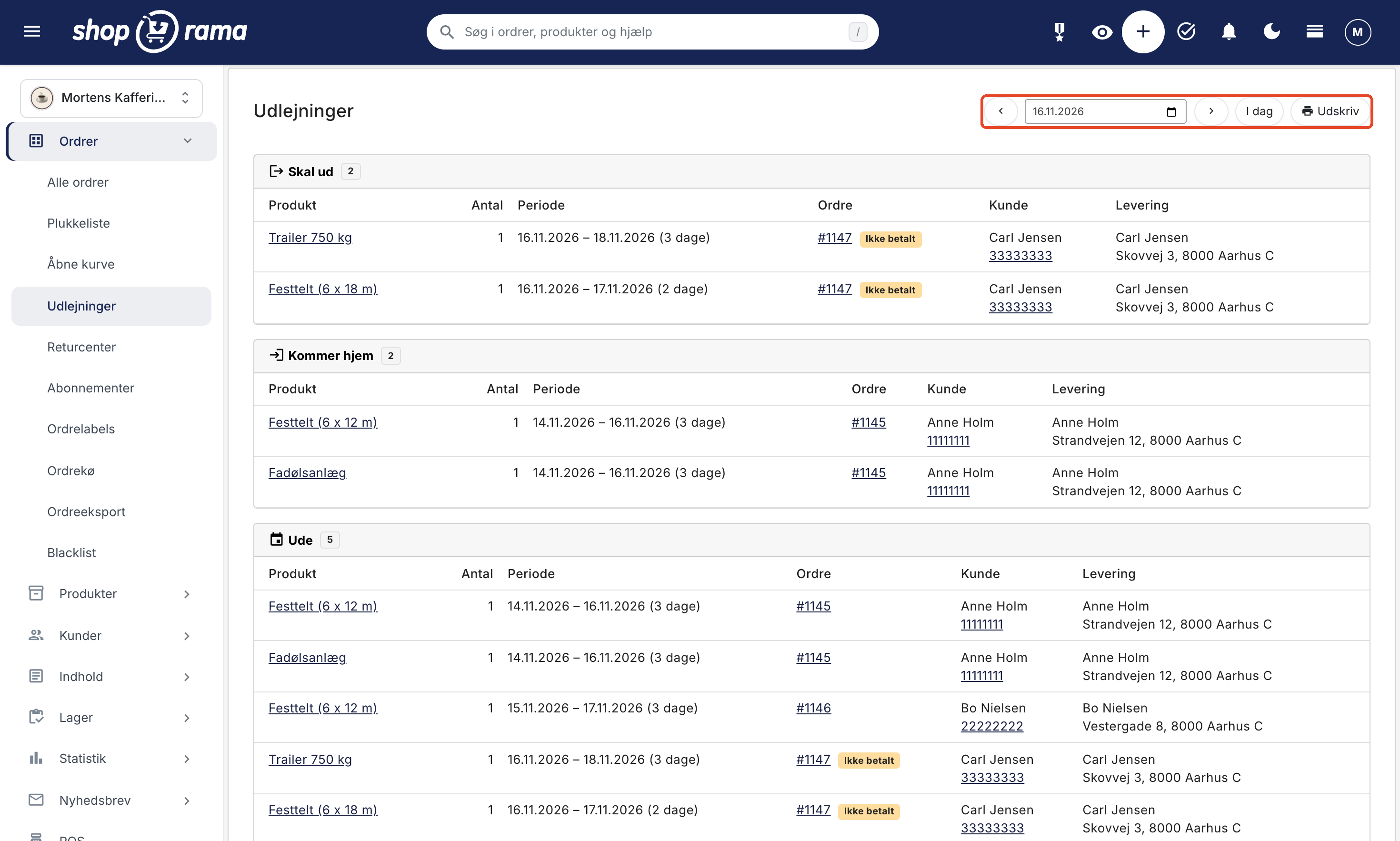
Under Orders → Rentals, select a date to view three lists: Outgoing, Returning, and Out. Each line includes the product, quantity, rental period, order number, customer’s name and phone number, and delivery address. Unpaid orders are marked “Unpaid,” so you can see who still needs to pay before items are shipped out. The list can be printed and taken to the warehouse.
If there is a day within the next 30 days when more units have been rented out than you have available, it will appear at the top of the page in a red box labeled “Overbooked.” This can happen if two customers pay for the last unit at the exact same time, or if you’ve adjusted a rental period. The box links to the relevant days so you can find a solution in time.
If a customer still calls to make a booking, create the order in the admin panel as usual, add the product, and set the period using “Edit Period” on the order line. The price on the line is the daily rate, so you’ll need to adjust it yourself for the entire period. With “Adjust Period,” you can also move a booking if the customer wants the tent a day later. If there aren’t enough units available for the new period, the booking will still be saved, and you’ll receive a warning.
Utilization Rate: Do you know how much your equipment is earning?
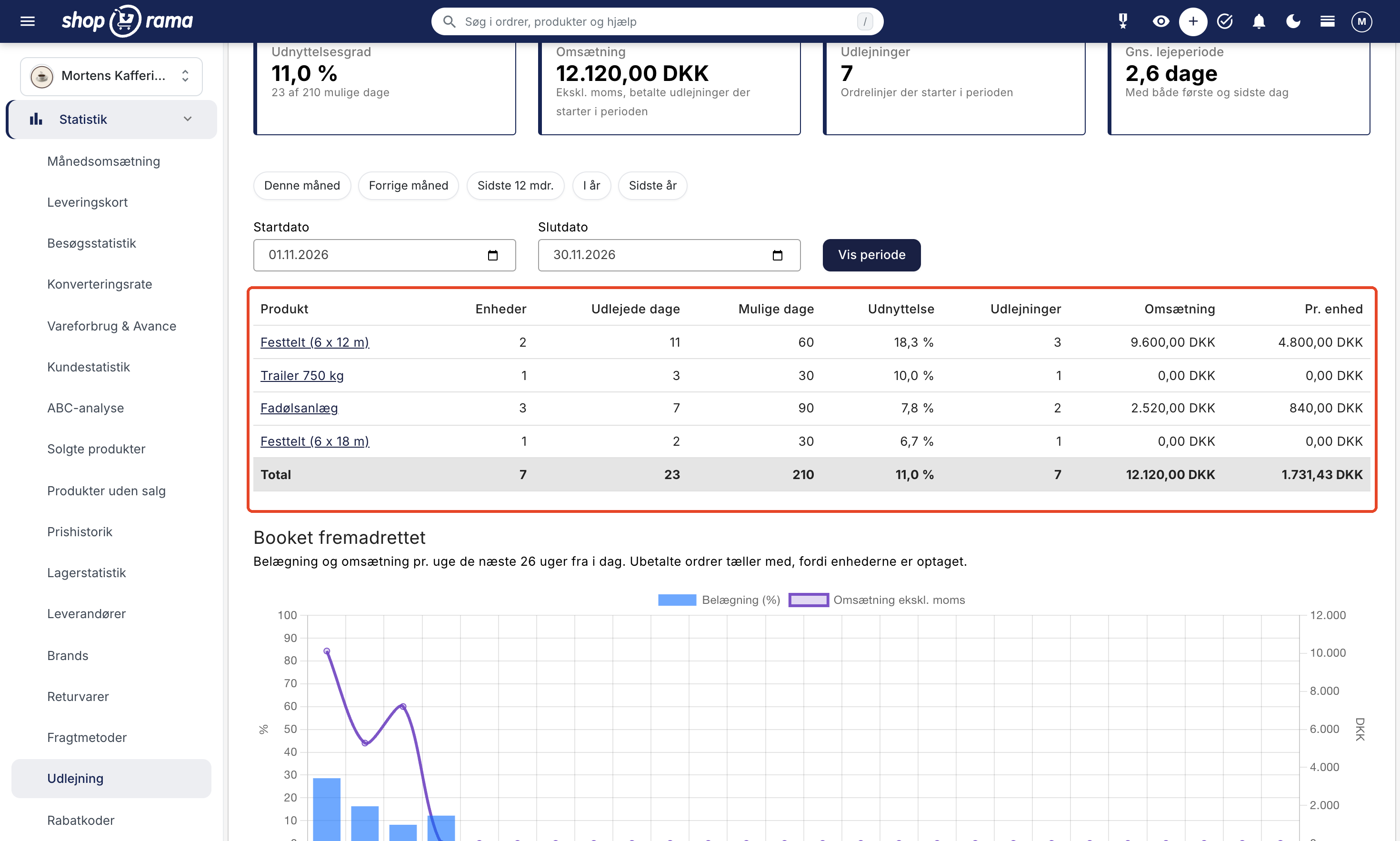
When you rent out items, it’s not just revenue that counts, but also how much time your items spend idle. Under Statistics → Rentals, you’ll see the utilization rate—that is, the number of days rented divided by the total number of possible days—both overall and for each product and variant. Next to that, you’ll see revenue, number of rentals, the average rental period, and revenue per unit.
The “Future Bookings” graph shows occupancy and revenue per week for the next 26 weeks, so you can see when the season peaks. If the party tents are rented out almost every weekend, it might be time to buy another one. If the trailer sits idle most of the month, it’s worth reviewing its price or placement in the online store.
How to Set Up Rentals
- Enable “Rental” on a product profile. Under Web Store → Product Profiles, create or open a profile and check the “Rental” box. If the customer needs to select a size, for example, give the profile one variant.
- Create the products. The price is per day, and the stock quantity is the number of units you own per variant, if the profile has one. If the product has 0 in stock, it cannot be rented.
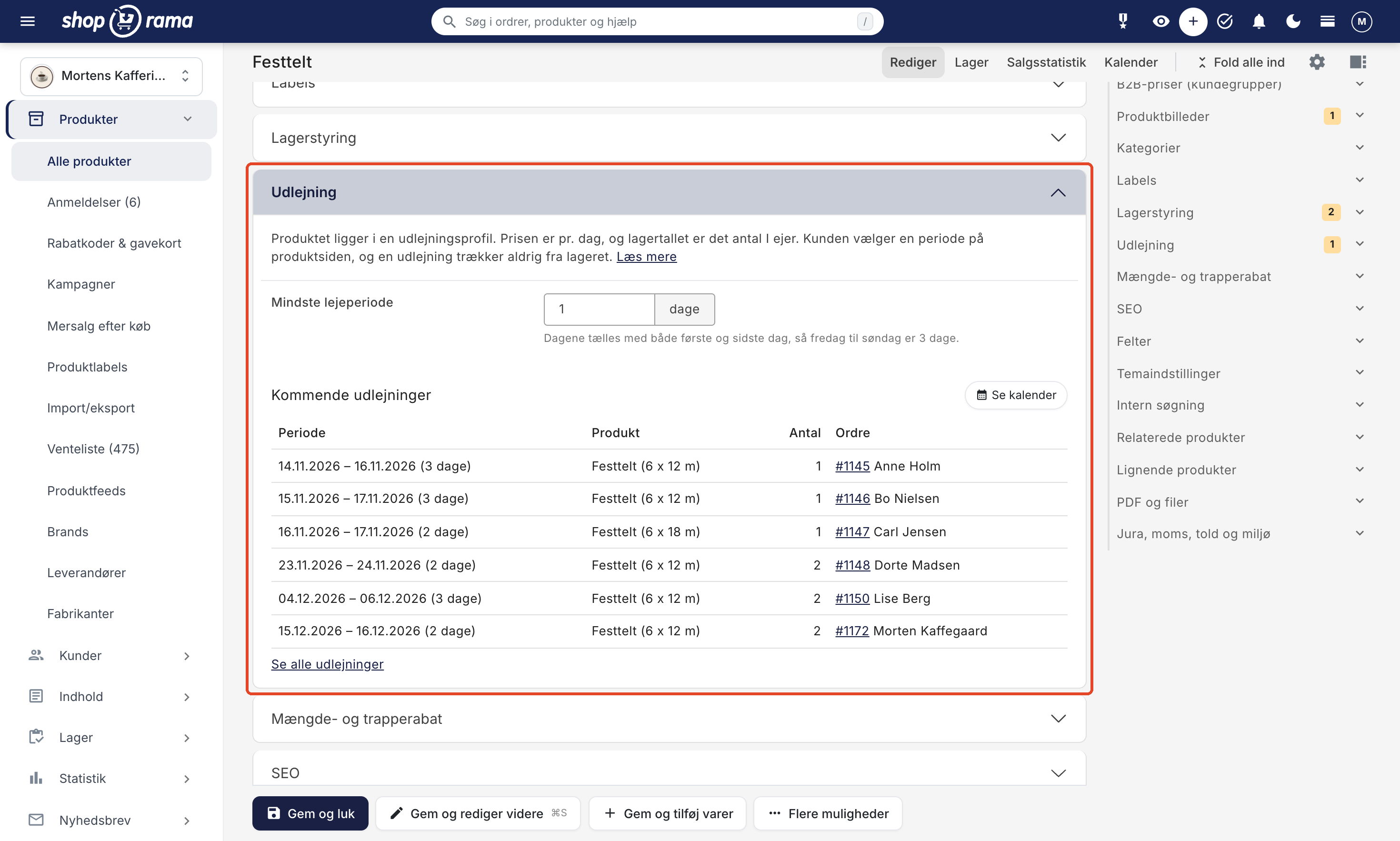
- Set a minimum rental period if needed. You can do this on the “Rental” card for the product, where you can also view upcoming rentals.
- Check your theme. The date picker is available in the Montana, MontanaB2B, Delaware, and DelawareDK themes.
The full guide is available in the article on rentals, and you can find a brief overview of the feature on the rentals page.
Online store or specialized rental system?
There are systems designed exclusively for rentals and bookings. They may offer additional features specifically for rentals, such as security deposits, hourly rates, or tracking of individual items. On the other hand, they’re often a separate system alongside the online store or a booking module integrated into the website. If you also sell products, you’ll end up with two systems, two shopping carts, and two places to keep track of customers, orders, and payments.
In Shoporama, the online store and rental system are one integrated system. Rentals are treated as regular orders, so customers shop in the same shopping cart and check out at the same checkout, and you use the same payment methods, shipping methods, order confirmation emails, and invoices that you already use. Regular products and rentals can be included in the same order.
If you need security deposits, hourly rates, or tracking for each individual item, a specialized system might be the right choice. If you rent out items by the day and want to manage rentals through the same online store as the rest of your business, Shoporama is a great place to start.
What You Need to Know Before You Start
Rental is a new feature in Shoporama, and the first version has some limitations:
- No security deposit. Shoporama cannot collect a deposit that is refunded to the customer once the item is returned in good condition. If you want part of the rental fee paid at the time of booking and the rest later, enable “Installment Payments” in the rental profile. Otherwise, the customer pays the full rental fee at the time of booking.
- No buffer between rentals. The return date counts as a rental day, so the item can be rented out again no earlier than the following day.
- Price per day only. There are no weekend or weekly rates.
- No distance-based delivery charges. You use standard shipping methods.
- Quantity, not individual units. Shoporama keeps track of how many are out on rental, but not which trailer or tent the customer receives.
- Available only in the online store. Rentals cannot be sold at the POS, via the Headless API, as a bundle, or as a subscription.
- The rental period is fixed in the cart. If the customer wants to change it, they must remove the line item and select the dates again.
- Not included in product feeds. Rental products are not included in Google Shopping, PriceRunner, or Shoporama’s other regular feeds. You manage your own feeds under Products → Product Feeds. They still appear in the online store’s categories, search results, and sitemap.
- Available in four themes only. The date picker is available in Montana, MontanaB2B, Delaware, and DelawareDK. If you have your own theme, please email support@shoporama.dk.
Frequently Asked Questions About the Rental Web Store
Can customers see which days are available?
Yes. The product page displays a two-month calendar where days prior to today and days with no available units are crossed out. If the product has variants—such as tent size—the calendar shows the available days for the variant the customer selects. The calendar also takes into account what the customer already has in their cart.
How do I avoid double bookings?
Shoporama tracks the maximum number of units that can be checked out in a single day during the period the customer selects, and the period is checked again when the item is added to the cart. Unpaid orders are counted, while canceled orders and credit memos are not. If two customers pay for the last unit at exactly the same moment, both can receive the order. This will be listed under “Overbooked” on the “Rentals” page under “Orders.”
Can I still accept bookings over the phone?
Yes. Create the order in the admin panel as usual, add the product, and set the period using “Edit Period” on the order line. The price on the line is the daily rate, so adjust it yourself to cover the entire period. The booking will appear in the webshop calendar just like a booking the customer made themselves. If you use automatic cancellation for unpaid orders, mark the order as paid or assign it a status other than “New”; otherwise, it will be canceled.
Can I charge a deposit?
Shoporama cannot charge a security deposit that is refunded to the customer when the item is returned in good condition. If you want part of the rental fee paid at the time of booking and the rest later, you can enable “Installment Payments” in the rental profile. Then, for example, the customer pays 25% immediately, and the rest is automatically charged via a payment link before the rental period begins.
Can I both sell items and rent them out in the same online store?
Yes. Rental products and regular items can be added to the same cart and combined into a single order, so the customer can, for example, rent a draft beer system and buy mugs at the same time. Regular items are deducted from inventory as usual, while a rental is never deducted from inventory.
Can I rent out tents in multiple sizes?
Yes. A rental listing can have one variant, such as size. Each variant has its own quantity, which you set as the stock level, and can have its own price per day. The customer selects the variant on the product page, and the calendar shows the available dates for that specific variant.
Can I offer a weekend rate or require the customer to rent for multiple days?
The price is always per day, and there are no weekend or weekly rates in the first version. You can set a minimum rental period for each product, such as 2 days. The days are counted including both the first and last day, so Friday through Sunday counts as 3 days.
Does the rental feature work with my theme?
The date picker is available in the Montana, MontanaB2B, Delaware, and DelawareDK themes. If you’re using a different theme, the product profile will display a warning, and customers won’t be able to add rental products to their cart. If you have your own theme, please email support@shoporama.dk.
Get started with online rentals
If you want fewer phone calls, fewer double bookings, and a clear overview of what’s going out and coming back, try rentals in Shoporama. If you already have a Shoporama online store, simply enable this feature on a product profile. If you’re not a customer yet, you can set up an online store and try it out for yourself. If you have questions about the setup, please email support@shoporama.dk.