Environmental data on products
Guide to recording environmental data on products in Shoporama. Enter packaging, electronic waste (WEEE), and battery information for EPR compliance.
Shoporama giver dig mulighed for at registrere miljødata på dine produkter. Det er relevant for overholdelse af EPR-regler (udvidet producentansvar) og giver dig et overblik over emballage, elektronikaffald (WEEE) og batterier i dit sortiment.
Hvorfor skal du udfylde miljødata?
Tre EU-områder gør producentansvar relevant for danske webshops, og du skal kunne dokumentere og indberette mængder af emballage, elektronik og batterier til myndighederne.
- Emballageproducentansvar. Det danske emballageproducentansvar trådte i kraft 1. oktober 2025. Du indberetter årligt vægt pr. materiale (papir/pap, plast, metal, glas, træ, øvrige) til DPA-System. Læs guide til emballageproducentansvar for webshops.
- WEEE-direktivet (2012/19/EU) dækker elektrisk og elektronisk udstyr. Læs WEEE-direktivet for danske webshops.
- EU's batteriforordning (2023/1542) afløser det gamle batteridirektiv og udvider kravene gradvist frem mod 2027. Læs guide til EU's batteriforordning.
Begreberne kort forklaret i ordbogen: EPR, WEEE og producentansvar.
Aktivér miljødata
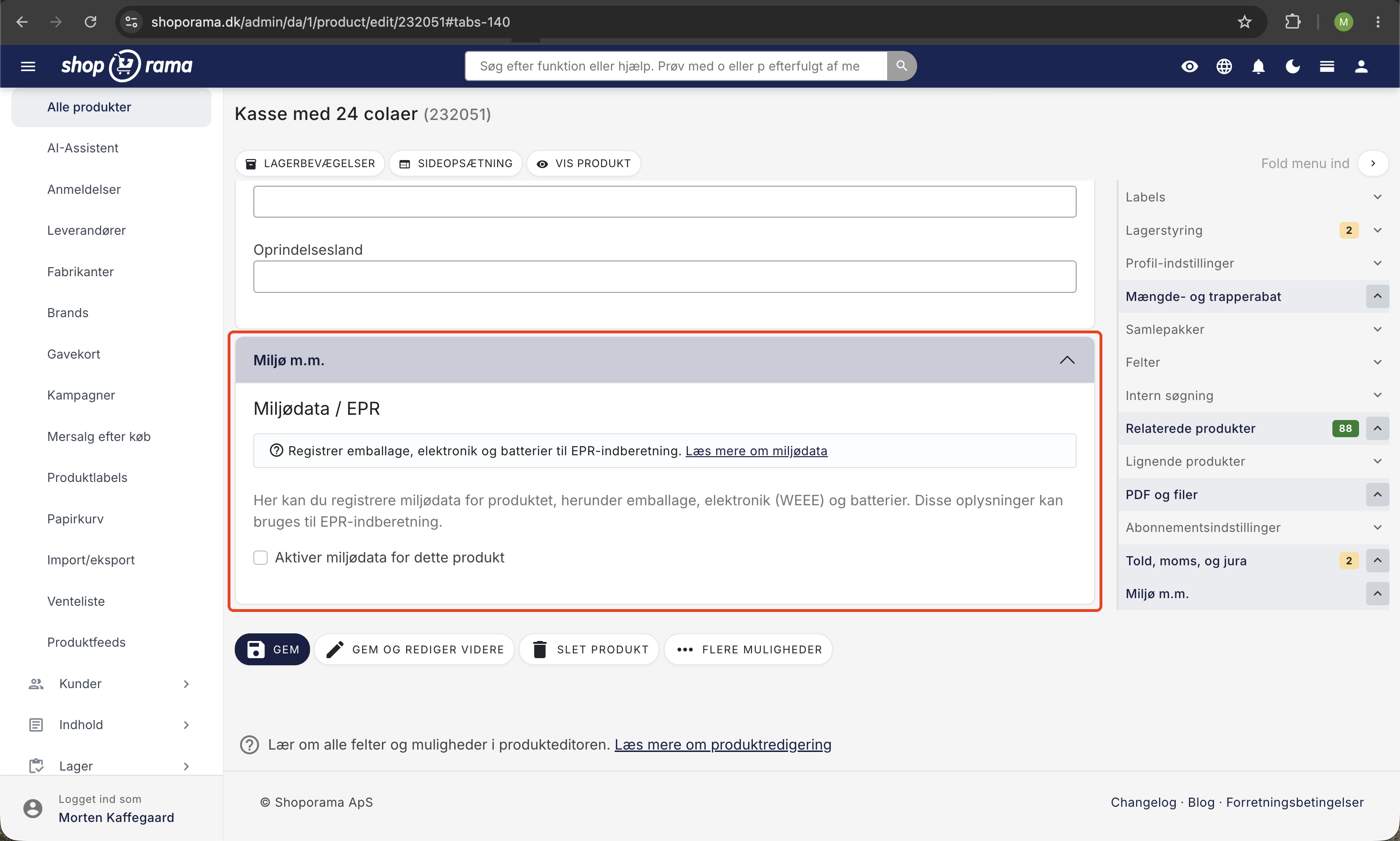
Du finder miljødata under redigering af det enkelte produkt i sektionen Miljø m.m. Sæt flueben i Aktivér miljødata for dette produkt for at åbne felterne.
Emballage
Angiv vægten af emballagen pr. enhed fordelt på materialer (i gram):
- Papir/pap
- Plast
- Metal
- Glas
- Træ
- Andet materiale
Systemet beregner automatisk den samlede emballagevægt.
Elektronikaffald (WEEE)
Hvis produktet er elektronisk, kan du angive:
- Vægt. Apparatets vægt i gram (ekskl. batteri).
- WEEE-kategori. Vælg den korrekte kategori, fx store husholdningsapparater, IT-udstyr, belysning, legetøj m.fl.
Batterier
Hvis produktet indeholder et batteri, kan du angive:
- Batterivægt. Vægten i gram.
- Batteritype. Fx lithium-ion, alkaline, nikkel-metalhydrid, knapcelle m.fl.
- Integreret. Om batteriet er integreret eller kan fjernes.
EPR-registreringsnummer
Du kan angive dit EPR-registreringsnummer (fra fx Emballageretur, Elretur eller Batteriretur) direkte på produktet. Det kan bruges til rapportering og dokumentation.
Import og eksport via CSV
Miljødata kan importeres via CSV-import af produkter. Brug kolonnerne env_enabled, env_packaging_paper, env_packaging_plastic osv.
Du kan også eksportere en samlet miljørapport for solgte produkter under Ordrer → Eksporter miljødata. Her angiver du en ordreperiode og får en CSV-fil med alle miljødata ganget med solgte antal, klar til indrapportering.
Tip
Brug CSV-import til at masseregistrere miljødata på mange produkter på én gang, i stedet for at udfylde det manuelt på hvert produkt.
Indlæs og opdater miljødata via REST API
Alle miljødata-felter er også tilgængelige via Shoporamas REST API som et nested environment-objekt på produktet. Det gør det nemt at synkronisere data fra et eksternt PIM- eller ERP-system, eller at trække data ud til årlig indberetning hos DPA-System.
Felterne er en del af det almindelige product-endpoint:
- Hent: GET /v1/product/{id} returnerer environment-objektet hvis produktet har miljødata.
- Opdater: PUT /v1/product/{id} med et environment-objekt. Det er partial update, så kun medsendte felter ændres. Tom streng rydder et felt.
- Slet alle miljødata: Send environment med enabled: false. Det fjerner rækken og al miljødata for produktet.
Eksempel-payload
PUT /v1/product/12345
{
  "environment": {
    "enabled": true,
    "packaging_paper": 50,
    "packaging_plastic": 5,
    "weee_weight": 320,
    "weee_category": "small_equipment",
    "battery_weight": 30,
    "battery_type": "li-ion",
    "battery_integrated": 1,
    "epr_registration_number": "12345678"
  }
}
Tilgængelige felter
- enabled (boolean). Aktiver miljødata. false sletter rækken.
- packaging_paper, packaging_plastic, packaging_metal, packaging_glass, packaging_wood, packaging_other (integer, gram pr. enhed).
- packaging_total (integer, read-only). Sum af alle emballage-vægte. Ignoreres ved skrivning.
- weee_weight (integer, gram). Apparatets vægt uden batteri.
- weee_category (string). Officiel WEEE-kategori. Tilladte værdier: large_equipment, small_equipment, it_telecom, consumer_equipment, lighting, electrical_tools, toys_leisure_sports, medical_devices, monitoring_control, dispensers.
- battery_weight (integer, gram).
- battery_type (string). Tilladte værdier: li-ion, li-polymer, nimh, nicd, alkaline, zinc-carbon, button-cell, lead-acid, other.
- battery_integrated (0/1). Om batteriet er integreret eller aftageligt.
- epr_registration_number (string).
- note (string). Intern note.
Den fulde tekniske dokumentation finder du i Shoporamas OpenAPI-specifikation under product-endpointet.
Ofte stillede spørgsmål
Hvor finder jeg miljødata-felterne i admin?
Gå ind på et produkt og find sektionen Miljø m.m. nederst. Sæt flueben i Aktivér miljødata for dette produkt, så åbner felterne sig.
Skal jeg udfylde miljødata på alle produkter?
Du skal kun udfylde det, der er relevant for det enkelte produkt. Sælger du almindelige varer, er det typisk emballage. Sælger du elektronik, udfylder du også WEEE-felterne. Indeholder produktet et batteri, udfylder du batteri-felterne.
Hvordan trækker jeg en rapport til indberetning?
Gå til Ordrer → Eksporter miljødata, vælg den periode du skal indberette for, og hent CSV-filen. Den summerer mængderne fra alle ordrer i perioden og giver totaler pr. materiale og kategori.
Kan jeg masseopdatere miljødata?
Ja. Brug CSV-import af produkter med kolonnerne env_enabled, env_packaging_paper, env_packaging_plastic, env_weee_weight, env_weee_category, env_battery_weight, env_battery_type, env_battery_integrated og env_epr_registration_number. Eller brug REST API'et og opdater environment-objektet pr. produkt.
Hvad gør jeg, hvis jeg sælger samme produkt med forskellig emballage?
Angiv den gennemsnitlige emballagevægt pr. enhed. Hvis du fx sender ti styk i samme kasse, så fordel kassens vægt på de ti enheder. På den måde bliver totalerne ved eksport korrekte uanset ordrestørrelse.
Hvordan kommer mine miljødata over i mit regnskab?
Miljødata gemmes pr. produkt og rapporteres via Ordrer → Eksporter miljødata. CSV-filen er beregnet til indberetning til DPA-System eller en kollektivordning, ikke til bogføringssystemet. Selve gebyret du betaler kan bogføres som en almindelig udgift.
Hvad er forskellen på WEEE og EPR?
EPR (udvidet producentansvar) er paraplybegrebet for alle tre områder: emballage, elektronik og batterier. WEEE er specifikt elektronik-delen. Se ordbogen: EPR og WEEE.
Kan jeg integrere det med mit eget PIM- eller ERP-system?
Ja. Alle miljødata-felter er tilgængelige via Shoporamas REST API som et environment-objekt på product-endpointet. Du kan både hente og opdatere felterne fra et eksternt system, så data altid er synkroniseret.
Hvad sker der, hvis jeg ikke indberetter?
Manglende indberetning til DPA-System eller en kollektivordning kan udløse bøde og krav om efter-indberetning. Lovgivningen er gradvist håndhævet, men reglerne strammes løbende. Vi anbefaler at registrere data løbende, så du undgår at samle et helt års manglende felter ind før deadline.
Har du spørgsmål til miljødata-felterne, så skriv til support@shoporama.dk.
Related articles
Age verification on products
Guide to setting up age verification on products in Shoporama. Set the age requirement to 16 or 18 years and let the payment gateway handle the...
Google Shopping category ID on products
Guide to adding Google Shopping category IDs to products in Shoporama via extra fields.
Related features
Environmental data on products
Record environmental data on your products with Shoporama. Packaging, electronics (WEEE) and batteries. Export summarized data for EPR reporting.
EPR (Extended Producer Responsibility)
EPR (Extended Producer Responsibility) is the principle that manufacturers bear responsibility for packaging, electronics and batteries throughout...
WEEE (electronic waste)
WEEE is electronic waste covered by EU Directive 2012/19/EU. Get an overview of categories, obligations for webshops and how Shoporama supports...
Producer responsibility
Producer responsibility means that the manufacturer or importer is responsible for the disposal of the product. Get an overview of packaging, WEEE...
Danish packaging producer responsibility: what to report and how Shoporama covers it
The law came into force on October 1, 2025. How to register with DPA-System and report packaging weights directly from Shoporama without additional...
The WEEE directive for Danish webshops: requirements, categories and how to get started
Guide to the WEEE directive for webshops: DPA-System duties, the 10 categories, labeling, reporting and how Shoporama keeps track of environmental...
EU Battery Regulation 2023/1542: what webshops need to know
The new EU Battery Regulation (2023/1542) replaces Directive 2006/66 and introduces battery passport, CO2 labeling and stricter requirements. See...