Sell in multiple countries through the online store you already have
Now you can sell in other countries through the online store you already have. Under Online Store → Countries, you can set a unique address, language, currency, and prices for each country, and automatic translation of your text is included in the price. Products, inventory, orders, and customers are all managed in the same admin panel, so you don’t have to run a separate online store for each country.
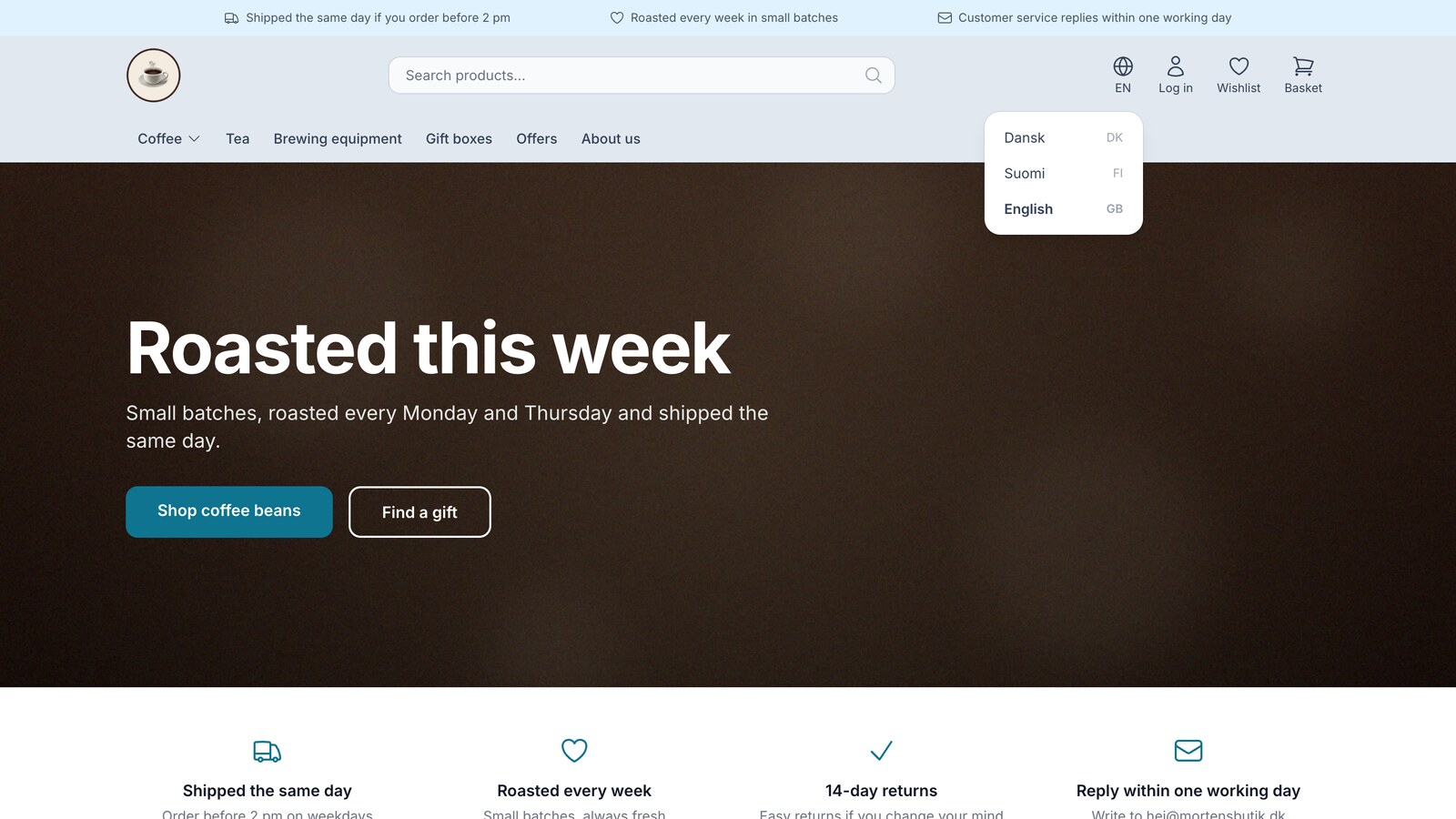
A customer in Stockholm finds your coffee on Google. She clicks through and sees Danish text, prices in Danish kroner, and a shipping page that only mentions Denmark. She closes the tab—not because she didn’t want to buy, but because she wasn’t sure you’d sell to her.
Until now, the typical solution was to set up another online store: a Swedish version with the products re-entered, an inventory that had to be kept in sync, and a translator paid by the hour. It’s certainly possible, but it’s double the work, which is why the idea often never gets off the ground.
Now, instead, you can add that country to the online store you already have. The new page “Web Store → Countries” gives each country its own address, language, currency, and prices, while products, inventory, orders, and customers remain in the same admin panel. All the details are in the article “Sell in Multiple Countries.”
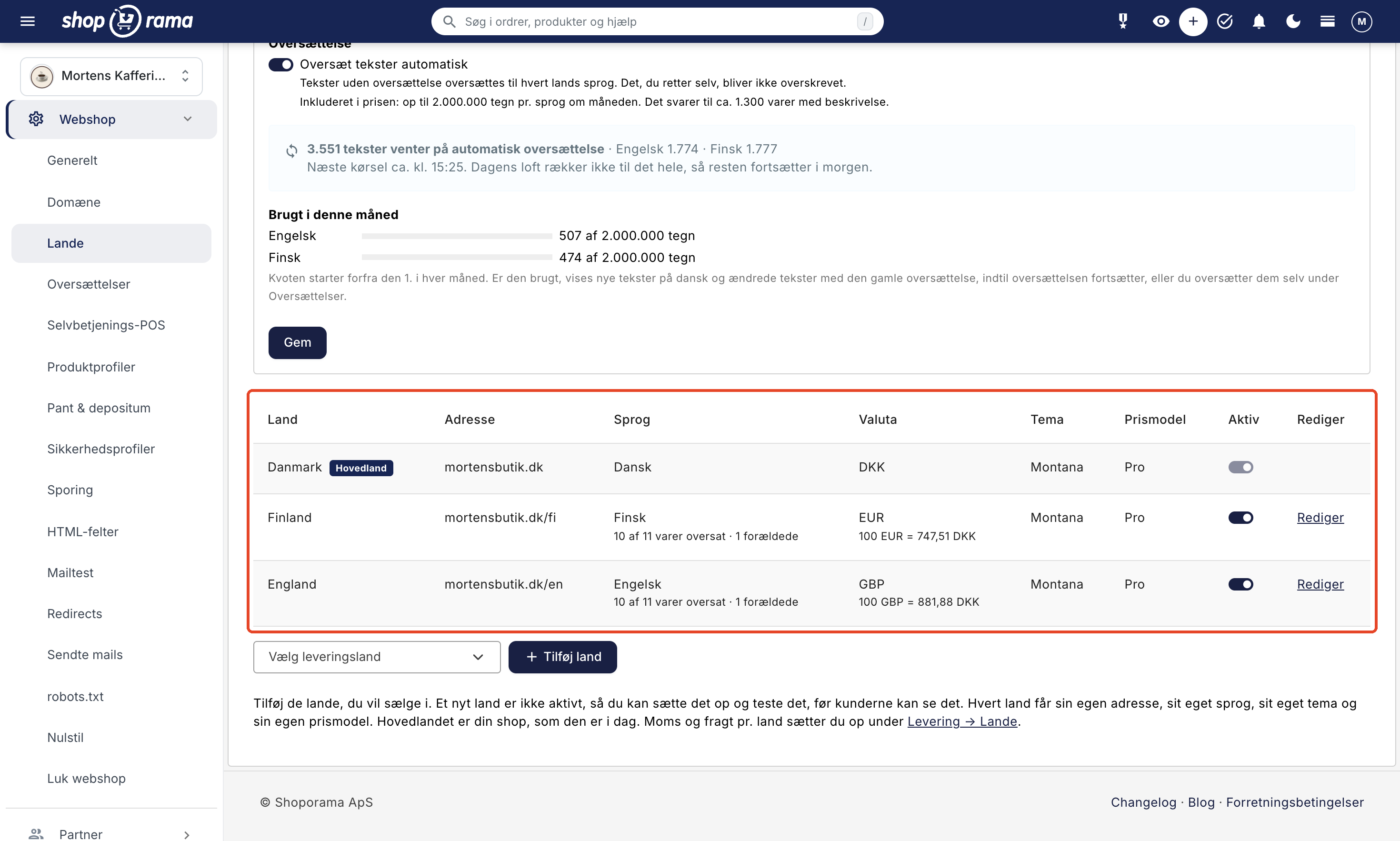
Each country is your store in that country’s language
Your store, as it is today, becomes the main country and continues exactly as before. Each new country builds on that foundation. You choose whether the country should be located on a subpath such as dinshop.dk/se or on its own domain such as dinshop.se. You choose the language from among 22 European languages and the currency from among 14, including the euro, Swedish and Norwegian kroner, and British pounds. The country can use the same theme as the main country or its own, and you choose the pricing model for each country.
You have a single set of products for all countries. If you change a price, the prices in the other countries will update automatically, unless you’ve set a fixed price for the product in that country’s currency.
The text translates automatically, and this is included in the price
What usually stops a Danish online store from expanding internationally is the text. With “Countries,” products, categories, menus, pages, and the theme’s own text are automatically translated into each country’s language. Up to 2,000,000 characters per language per month are included. This corresponds to approximately 1,300 products with descriptions.
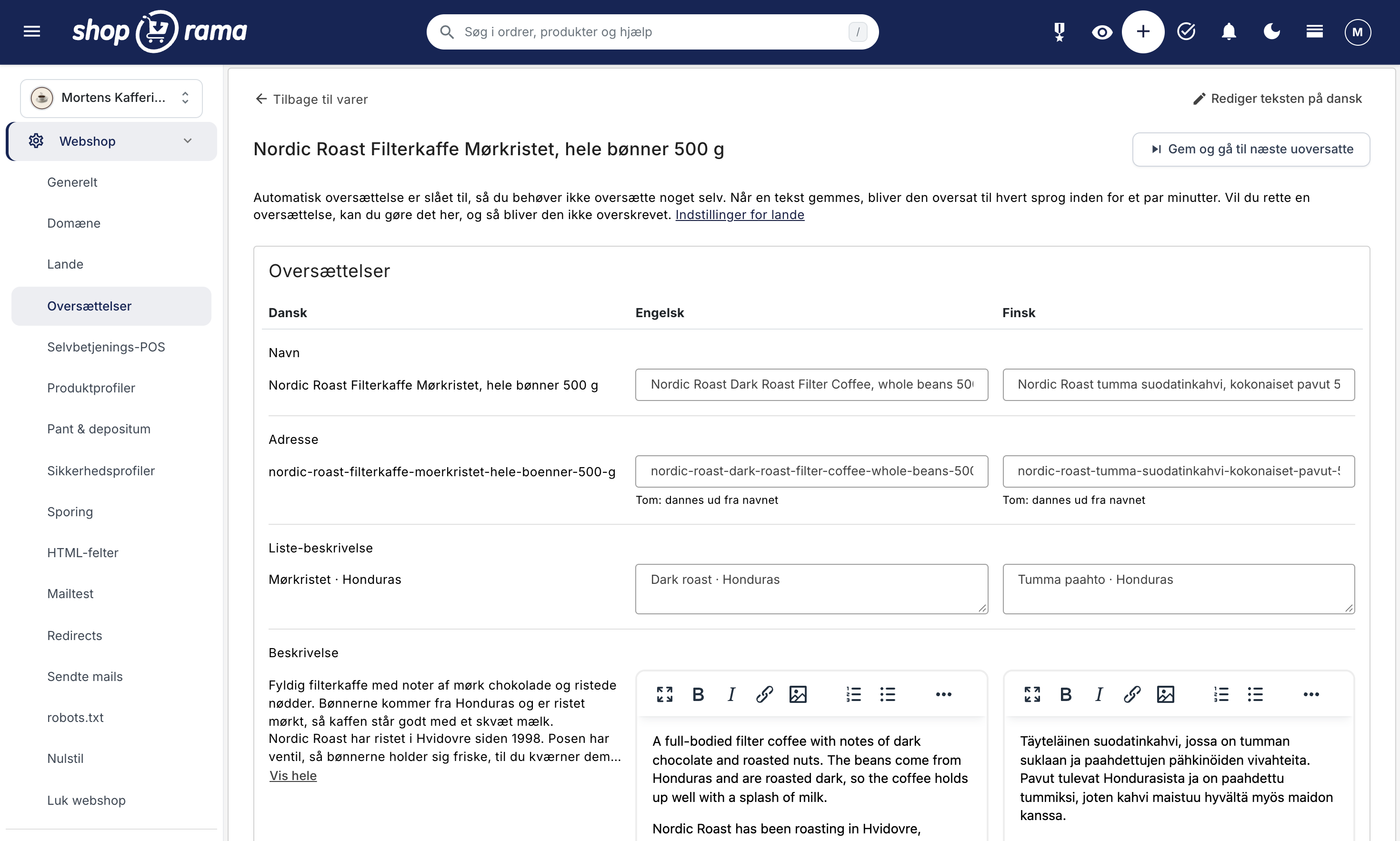
The translation only processes text that is missing or where the Danish text has been changed since the last translation. Anything you’ve edited yourself will never be overwritten. If you edit a product in Danish, the new text will be translated within a few minutes. If you have many products, the first translation may take a few days because there is a daily limit on the amount that can be translated. If the monthly quota is used up, new texts in Danish and modified texts will be displayed with the old translation until the quota resets on the 1st of the following month, or until you translate them yourself.
If you want to review the texts or give them a local touch, go to Webshop → Translations. This menu item appears as soon as a country has a language other than the main country’s. Here, the Danish text appears next to each language, and if you have a translator, you can download the texts as a CSV file and import them again.
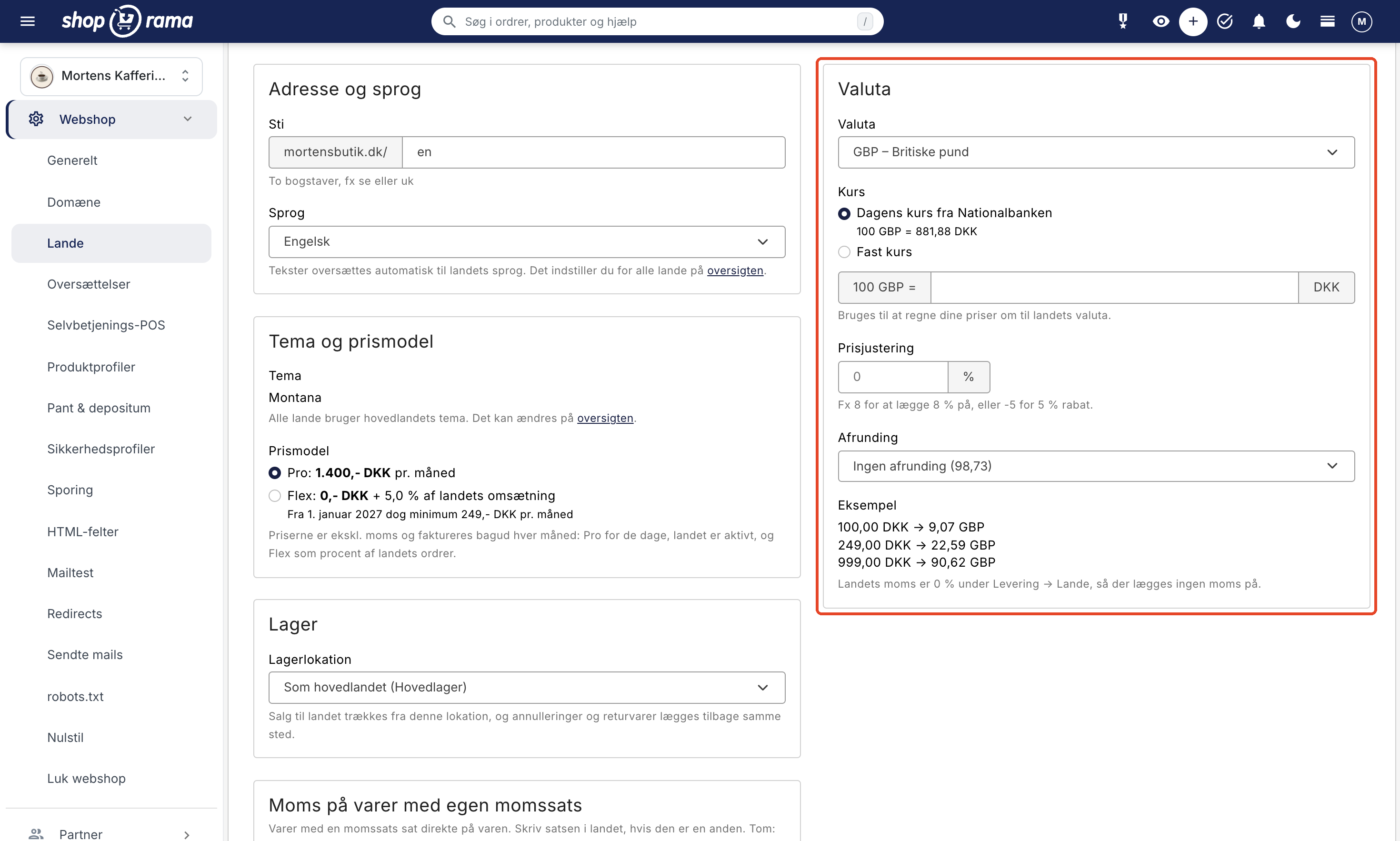
Prices that appear to have been set in the country
A price of 9.07 GBP looks like it’s been converted. A price of 8.99 GBP looks as if it were set in England. That’s why Lande doesn’t just convert your prices using the current exchange rate from the National Bank. You can also choose a fixed exchange rate, add or subtract a percentage, and round the prices so they end in .95 or .99 or are whole numbers. If a country has its own prices, they’re calculated using that country’s VAT rate, which you’ve set up under Delivery → Countries.
If a specific item is to cost exactly 199 SEK, enter a fixed price in the item’s currency, and it will apply in all countries using that currency. Shipping, free shipping thresholds, discount codes, and gift cards are automatically converted using the exchange rate, so you don’t need to set them up again.
The customer feels that the store is tailored to her
A customer in Stockholm switches to Swedish in the language selector and lands on the same page in Swedish. Products, categories, and pages display Swedish addresses, and the shopping cart updates automatically as she navigates. The checkout and order confirmation emails are in Swedish and in Swedish kronor, and the payment window is in Swedish if your payment solution supports it.
For each country, you choose which delivery countries, shipping methods, and payment methods customers can use. The billing address must be located in all your countries so that you comply with EU rules against geoblocking, while products are only delivered to the countries you’ve selected. If you have multiple warehouses, each country can pull products from its own warehouse.
Google finds the right version
Shoporama automatically sets up hreflang links between the language versions so that Google can display the Swedish page in Sweden and the Danish page in Denmark. Each country gets its own sitemap, and your Google Shopping feed is also available in each country with that country’s language, currency, and prices, just like the feeds for PriceRunner, Kelkoo, and Partner Ads. The country’s sitemap and feeds include only those products that have been translated into the country’s language.
Pages that haven’t been translated yet are displayed in Danish and are excluded from Google in that country until they’re translated. That way, you won’t end up with half-Danish pages in Swedish search results.
See how each country is performing
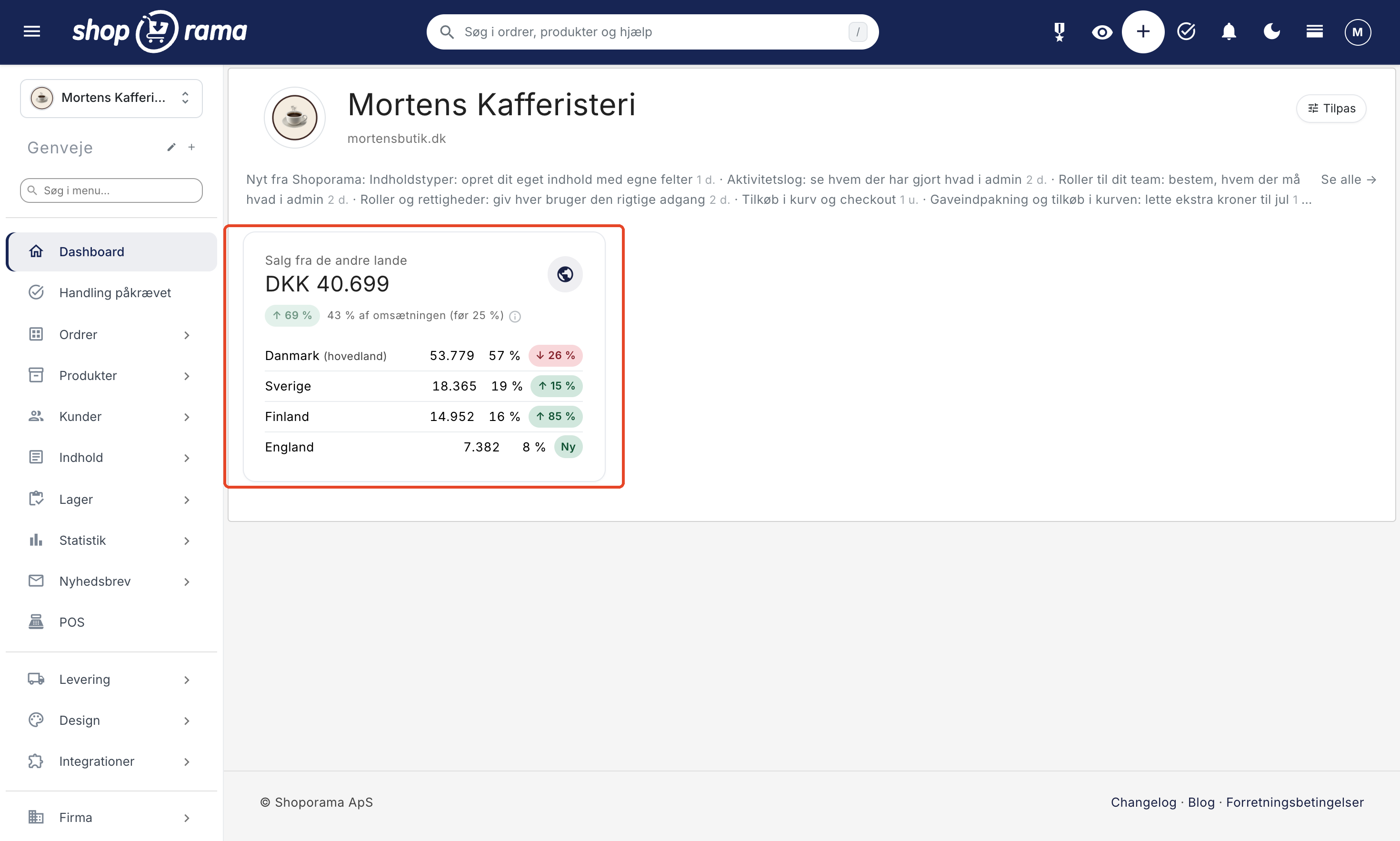
The “Sales from Other Countries” chart on the admin dashboard shows how much each country has sold over the past 30 days and which ones are growing. Under Statistics → Sales by Country, you can dive deeper into orders, average order value, new customers, and coverage rate for each country. All amounts are listed in your shop’s currency, so you can compare countries directly, and in the order overview, you can see which country an order was placed in.
Activate the country when you’re ready
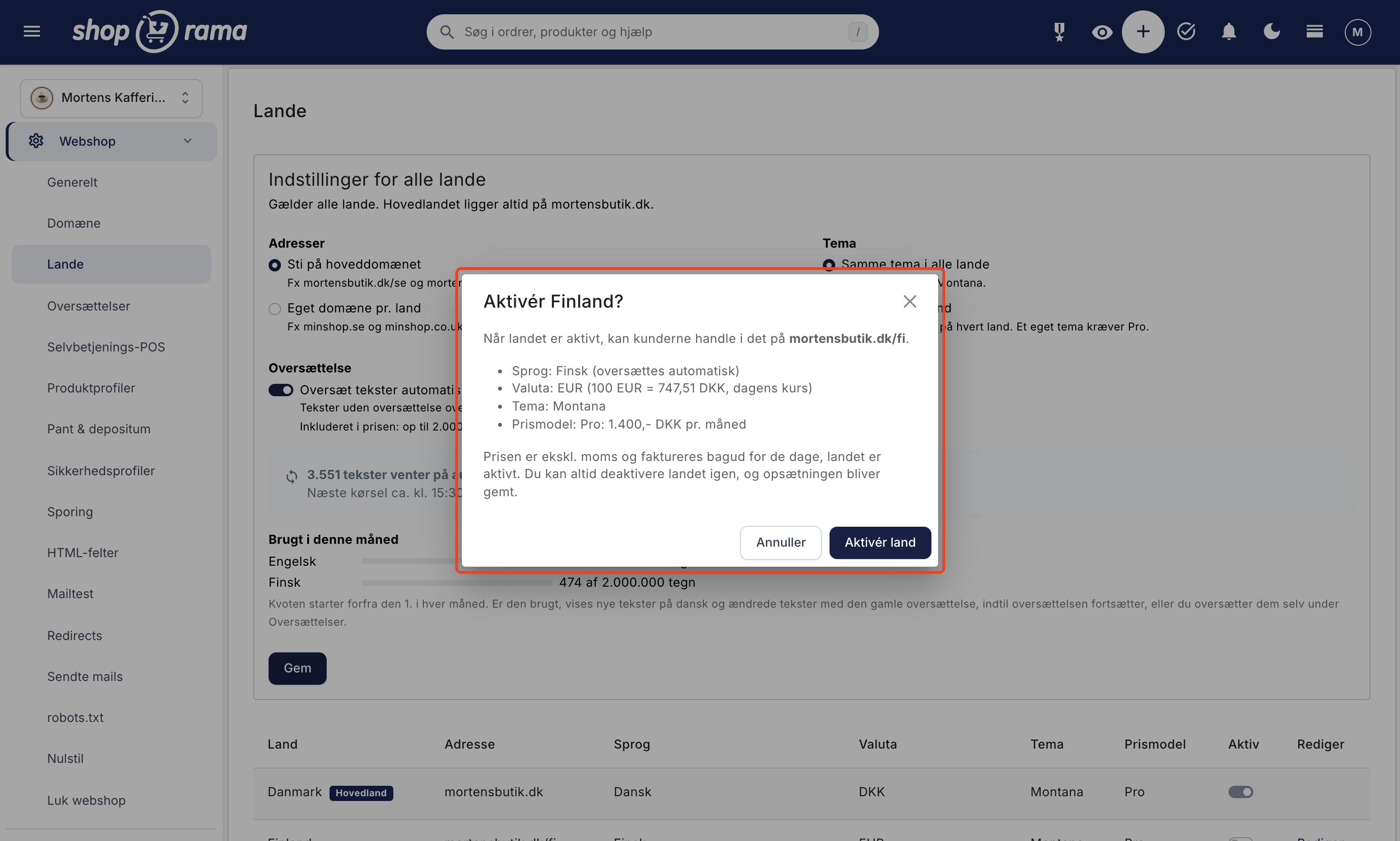
A new country isn’t active yet, so you can set it up and test it before customers can see it. When you toggle the switch to “Active,” a window will display the address, language, currency, theme, and price one last time before the country goes live. You can always turn the country off again, and the settings will be saved.
Because the country’s pricing model affects your bill, only users with the Full Access role can change the store’s countries.
How much does it cost?
The main country doesn’t cost extra. For each country you activate, you can choose between Pro for 1,400 DKK per month and Flex for 0 DKK + 5% of the country’s revenue; however, starting January 1, 2027, the minimum charge is 249 DKK per month. Prices exclude VAT and are billed monthly in arrears for the days the country has been active, and only after your store has gone live. Automatic translation is included, and if a country uses a custom-built theme, it must be on the Pro plan. See all prices on the pricing page.
Get Started
- Check your theme. Montana, MontanaB2B, Delaware, DelawareDK, California, Washington, Alaska2, and Alaska are ready for countries. The Countries page will let you know if your theme isn’t. If you have a custom-built theme, send your theme developer the guide “Get Your Theme Ready for Countries.”
- Create the shipping country. If the country isn’t listed under Shipping → Countries, create it there first, including tax and shipping rates.
- Add the country. Go to Web Store → Countries, select the country, and click “Add Country.” Select the address, language, currency, and pricing model, as well as which shipping countries, shipping methods, and payment methods customers can use.
- Let the translation run. Review the country settings, adjust anything that needs a local touch, and enable the country.
- Have your own domain? Enter the domain on the country’s page and have it point to Shoporama just like your main domain. Then click “Order Free SSL,” and we’ll install the certificate.
Start with the country from which you’re already receiving visitors or orders, and track your progress under “Sales by Country.” If you need help choosing countries or a pricing model, email support@shoporama.dk.
Related articles
Prepare your theme for multiple languages and countries
Step-by-Step Guide for Developers: How to Make Your Own Shoporama Theme Work with Countries, Including Translated Texts, the Country's Currency and...
Countries and Currency: Delivery Countries, Sales Tax, and Shipping
Set up delivery countries under Delivery → Countries with VAT rates, VAT zones, shipping options, and free shipping, and see how they relate to...
Sales by Country: Compare Your Countries in the Statistics
Statistics → Sales by Country shows revenue, orders, customers, and contribution margin for each country where you sell, as well as the Sales from...
Translate your online store into other languages
How to translate your online store when selling in multiple countries: automatic translation, status by language, corrections, addresses in the...
What does a Shoporama shop cost?
Pricing on Shoporama: Flex, Pro, and Storage; prices by country; usage-based add-ons; billing; changing pricing plans; and answers to frequently...
Sell in multiple countries and in multiple languages
Here's how to sell in other countries in your customers' languages and currencies using "Countries": Add a country, set up the address, language,...
More from the blog
Customer Club Newsletter: Sell More to Returning Customers
Your regular customers are the ones most likely to make repeat purchases. Now you can send the newsletter only to the customer club, to a specific...
14. oktober 2026
Roles for your team: Decide who has what permissions in the admin panel
Now the packer, the bookkeeper, and the web agency can each have their own role in the admin panel. You can choose from seven predefined roles and...
09. oktober 2026
Gift wrapping and add-ons in the cart: a little extra for Christmas
Black Friday and the holiday shopping season are just around the corner, and many orders are meant as gifts. Now you can offer gift wrapping,...
29. september 2026