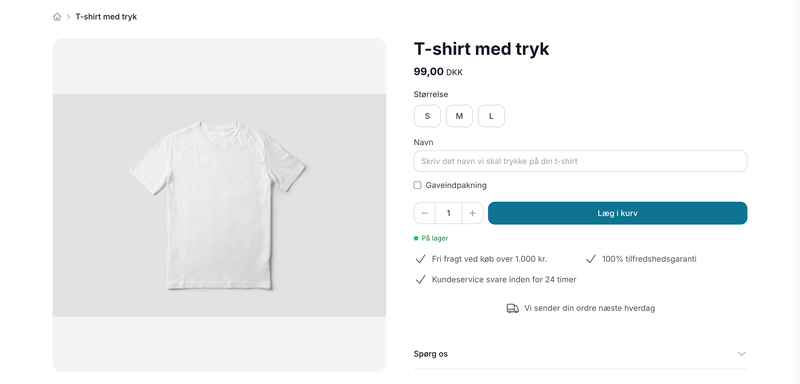
Exclude products from the right of withdrawal (e.g., custom-made items, perishable goods, digital content)
Here's how to label items that are legally exempt from the 14-day right of withdrawal, such as custom-made and perishable items, tickets for a specific date, and digital content. See what the customer sees on the product page, at checkout, and in the order confirmation.
Some items may be legally exempt from the 14-day right of withdrawal. This applies, for example, to custom-made items, perishable goods, sealed hygiene products, tickets for a specific date, and digital content that the customer has agreed to receive immediately. In Shoporama, you mark these types of items on the product page. In the default themes, the customer is then notified on the product page, at checkout, and in the order confirmation, and you’ll have a record of the order if the customer decides to cancel online after all. This guide explains when you can use the flag, how to set it, and what the customer sees.
In short: The tag is information for the customer, not a restriction. The customer can still submit a digital cancellation request, and you will then review each item. You are responsible for ensuring that you only exclude items that can legally be excluded.
What does it mean to exclude a product?
As a general rule, consumers have a 14-day right of withdrawal when making purchases from an online store. However, Section 18(2) of the Consumer Contracts Act excludes a number of goods and services for which the right of withdrawal either does not apply or lapses under certain circumstances. When you mark a product as exempt in Shoporama, the default themes display an explanation to the customer before and after the purchase, and the system automatically adds a note to the order if the customer cancels online. This marking does not affect your regular products.
When can a product be marked as an exception?
You may only use this designation when the item is actually exempt under the law. The “Right of Withdrawal” drop-down list includes the following options in addition to the default value “Standard Right of Withdrawal (14 days)”:
- Custom-made / Personalized (no right of withdrawal): Products made to the customer’s own specifications or that have a distinct personal touch, such as engraving, monogramming, custom sizing, or photo products. A standard choice of color or size does not make an item custom-made.
- Perishable goods (no right of withdrawal): Goods that spoil quickly or become stale, such as fresh food or cut flowers. Goods with a long shelf life are generally not covered.
- Sealed hygiene products (right of withdrawal void if seal is broken): Sealed products that, for health or hygiene reasons, cannot be returned once the seal has been broken. The right of withdrawal applies in full until the customer breaks the seal after delivery, and the item must actually be sealed.
- Indivisibly mixed goods (no right of withdrawal): Goods that, due to their nature, become indivisibly mixed with other items after delivery.
- Sealed audio, video, or software (right of withdrawal lapses upon broken seal): For example, CDs, DVDs, or computer games in sealed packaging. The right of withdrawal does not apply until the customer breaks the seal after delivery. Unsealed items are not covered.
- Newspapers, magazines, or periodicals (does not apply to subscriptions): Single issues of newspapers, magazines, and periodicals. A subscription is subject to the standard right of withdrawal, as are books, for example.
- Services on a specific date, such as tickets, courses, or lodging: This exception applies to lodging, freight transport, car rentals, food and beverages, and recreational activities when the agreement specifies a fixed date or period. An online course that the customer can take at any time is not covered.
- Digital content that the customer has agreed to receive immediately: Digital content that is not delivered on a physical medium, such as e-books, music, or downloadable files. This exception applies only when the customer has expressly consented to delivery beginning immediately and has acknowledged that the right of withdrawal thereby lapses. Without that consent, the customer retains the standard right of withdrawal.
- Price depends on fluctuations in the financial market, e.g., gold: Goods whose price depends on fluctuations in the financial market over which you have no control, such as investment gold. Standard jewelry with a fixed price is typically not covered, even if it contains gold.
- Another exception: Another legal exception. Always include a detailed note so the customer can see the reason. Otherwise, the customer will only see the general text: “This item is exempt from the standard 14-day right of withdrawal.”
Note: A standard selection of variants such as color or size (for example, “red, size L”) does not constitute a custom-made item. The customer has a full right of withdrawal for such products. If you use the marking incorrectly, you risk depriving the customer of a legal right, and the responsibility lies with you.
How to mark a product

- Edit the product you want to exclude.
- Expand the “Law, VAT, Customs, and Environment” tab. It’s located at the bottom of the product page, and you can also access it via the menu on the right.
- Under the “Sales and Legal” section, select the appropriate exception from the “Right of Withdrawal” drop-down list. The default value is “Standard Right of Withdrawal (14 days),” which you should not change for regular items.
- If desired, write a brief, friendly explanation in the “Additional Note” field (optional), e.g., “Engraved with your name and therefore cannot be returned.” Your note will replace the default text shown to the customer.
- Save the product.
Select multiple products at once
If you have many items that need to be excluded, you don’t need to open them one at a time. With table editing, you can select the entire selection in a single step:
- Go to Products, and find or filter the items you want to exclude.
- Check the boxes next to the items and click Table Editor.
- Open Select Fields and check the columns " Right of Withdrawal " and , if applicable , "Right of Withdrawal: Additional Note."
- Select the appropriate option in the Right of Withdrawal column for each product. All exceptions can be selected here, just with slightly shorter names. You can copy and paste values between cells if multiple products need the same selection.
- Click Save.
The selection applies per product. If you display variants in the table, the column can only be applied to the product itself, not per variant. Read more about table editing in " Bulk Editing of Products."
What does the customer see?
In the default themes Montana, Delaware, DelawareDK, Alaska2, California, and Washington, the customer is informed about the exception in several places, without you having to do anything other than mark the item.
On the product page

A discreet info box appears near the purchase button with an explanation, such as “This item is perishable and is therefore excluded from the 14-day right of withdrawal.” If you’ve written a detailed note, your note will appear instead.
At checkout
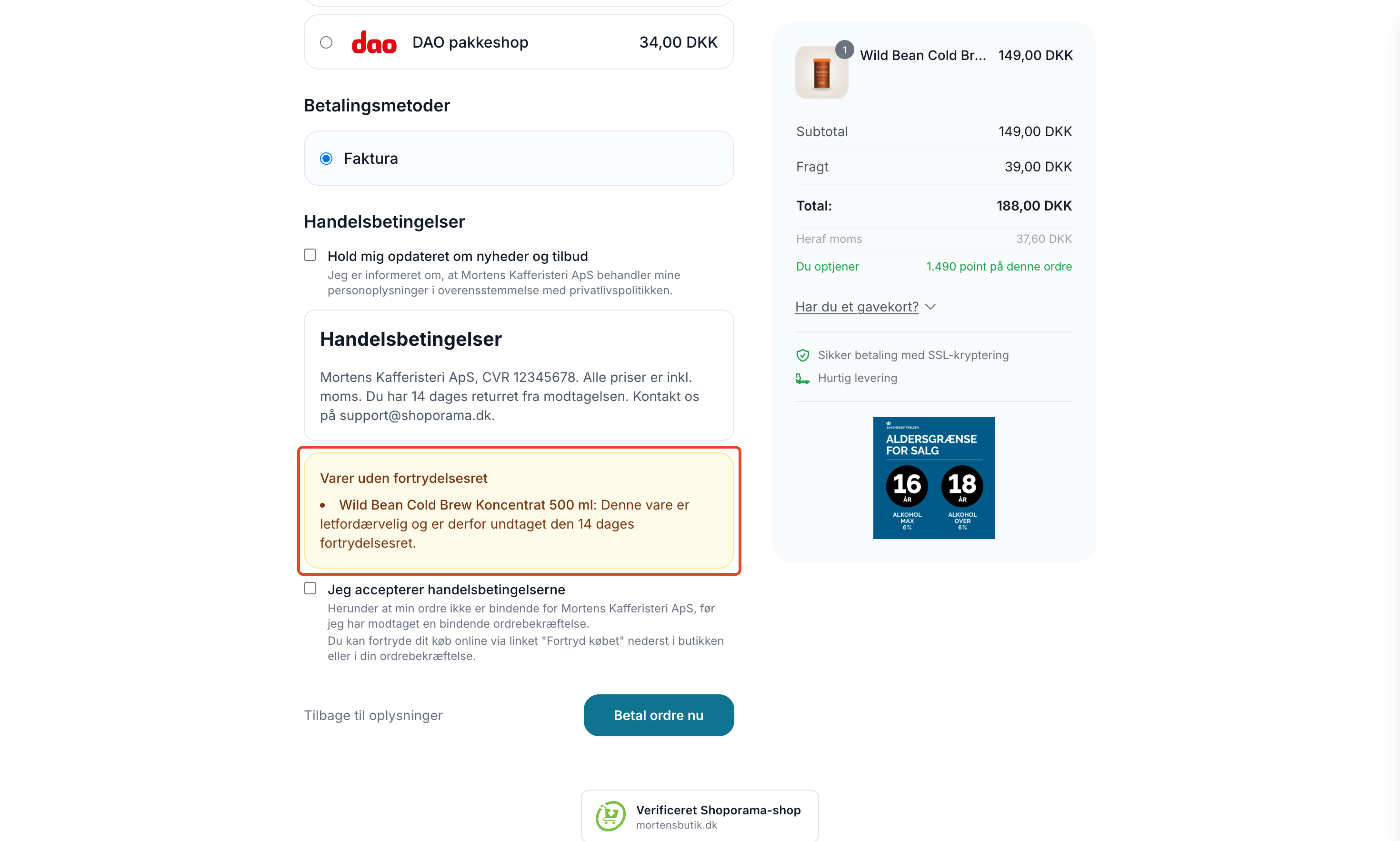
- Upon acceptance of the terms and conditions, the “Items Excluded from the Right of Withdrawal ” box will appear, listing the item name and explanation for each excluded item.
- If an item is marked as “Digital Content,” the customer must check the box next to: “I consent to the delivery of the digital content beginning immediately, and I acknowledge that I thereby lose my right of withdrawal.” Without checking this box, the customer cannot complete the purchase.
- In Montana, the “Full Right of Return” badge is automatically hidden when the cart contains items excluded from the right of withdrawal.
In the order confirmation and on the packing slip
The email order confirmation includes a section titled “Items Excluded from the Right of Withdrawal ” with the item names and an explanation. In Montana, Delaware, and DelawareDK, the excluded items are also listed on the packing slip under the text regarding the right of return.
If the customer cancels the order online
If the customer goes to the “Cancel Purchase” page, a warning appears listing the excluded items and an explanation. The customer can still submit the cancellation, as the law requires that the customer always be able to declare their cancellation. You then assess each item and determine whether the amount should be refunded. The order automatically receives a note listing exactly which items were marked as excluded.
MontanaB2B is a theme for business-to-business sales, where there is no right of cancellation. Therefore, this information does not appear in that theme.
Duty to Inform: What You Still Need to Remember
Under the Consumer Contracts Act, the customer must be informed that an item is excluded from the right of withdrawal before the contract is concluded (Section 8, paragraph 1), and this information must also be included in the order confirmation (Section 13). The standard themes display this information on the product page, at checkout, and in the order confirmation when the item is selected. However, you should also describe the exceptions in your terms and conditions. If you cannot document that the customer received this information, it may be difficult to reject a cancellation request.
If you use a custom or modified theme, this does not happen automatically. In that case, your developer must add the information; see the section for developers below.
This guide is for informational purposes only and does not constitute legal advice. If you have questions about the rules for a specific product, consult an attorney specializing in consumer law.
For Developers: Custom Themes and the API
This section is for developers. Shoporama cannot modify stores’ custom themes, so if you have a custom theme, the information must be added to the theme. Feel free to use a standard theme like Montana as a reference. The following template methods are available:
- $product->isWithdrawalExempt() returns true if the product is exempt.
- $product->getWithdrawalExemptReason() returns the reason, e.g., perishable or digital_content.
- $product->getWithdrawalExemptText() returns the final, translated text displayed to the customer, or the store’s own note if one has been entered.
- $order->hasWithdrawalExemptProducts() and $order->getWithdrawalExemptProducts() are used in the order confirmation and on the packing slip. The list contains name, amount, reason, and text.
Example on the product page and in the order confirmation:
<{if $product->isWithdrawalExempt()}>
    <p class="withdrawal-exempt"><{$product->getWithdrawalExemptText()|escape}></p>
<{/if}>

<{if $order->hasWithdrawalExemptProducts()}>
    <p><strong>Items not subject to the right of withdrawal</strong></p>
    <{foreach $order->getWithdrawalExemptProducts() as $item}>
        <p><{$item.name|escape}>: <{$item.text|escape}></p>
    <{/foreach}>
<{/if}>
If you sell digital content, the checkout must require consent when an item in the cart has the reason " digital_content":
<{if $product->getWithdrawalExemptReason() == 'digital_content'}>
    <label>
        <input type="checkbox" name="digital_content_consent" value="1" required>
        I consent to the delivery of the digital content beginning immediately,
        and I acknowledge that I thereby lose my right of withdrawal.
    </label>
<{/if}>
This checkbox can also be read and set via the REST API. For the product, use the ` withdrawal_exempt_reason ` field with one of the values `made_to_order`, `perishable`, `sealed_hygiene`, `inseparable`, `sealed_media`, newspapers, dated_service, digital_content, price_fluctuation, other, or null for the standard right of withdrawal, as well as withdrawal_exempt_note for the optional explanation. Headless themes such as Washington receive the same information on product pages in the fields `withdrawal_exempt`, ` withdrawal_exempt_reason`, and `withdrawal_exempt_text`.
The footer link and the cancellation page itself are described in Digital Cancellation.
Frequently Asked Questions
Where do I set the flag, and does it require any technical knowledge?
No technical knowledge is required. Edit the product as you normally would, expand the “Legal, Sales Tax, Customs, and Environment” tab, and select an exception from the “Right of Withdrawal” dropdown list under Sales and Legal. If necessary, write a short note to the customer, and remember to save.
Can I mark regular clothing by color and size to avoid returns?
No. For standard clothing such as “red, size L,” the customer has the full 14-day right of withdrawal, even if the customer selects the color and size. This labeling is only for items that are legally exempt, such as something you make specifically for a single customer, fresh flowers, or sealed hygiene products.
What should I write in the “Additional Note” field, and what does the customer see if it’s left blank?
If the note is empty, the customer will see a standard text that corresponds to the exception you’ve selected, such as “This item is perishable and is therefore exempt from the 14-day right of withdrawal.” If you write a note, it will replace the standard text. Write a brief and specific explanation of why the item cannot be returned. For “Other exception,” you should always include a note.
Can I exclude a single variant instead of the entire product?
No. The exemption applies to the product and covers all its variants. For example, if you have a T-shirt where only the version with a custom print is custom-made, you can create that version as a separate product and mark it as exempt.
Will the customer be prevented from canceling the order if the item is exempt?
No. The customer receives a clear warning listing the excluded items and your explanation, but can still submit a return request. The order automatically receives a note listing the excluded items, and then it’s up to you to assess each item and decide whether a refund should be issued. The note remains on the order as documentation.
Is the customer’s consent for digital content saved on the order?
No, the consent is not saved separately on the order. The checkout process simply cannot be completed without the checkbox being selected. The order confirmation includes a statement explaining that delivery begins after the customer’s consent and that the right of withdrawal therefore lapses.
Does “Full Return Policy” still appear at checkout when the customer has a non-returnable item in their cart?
Not on Montana. Here, the badge is automatically hidden when the cart contains items without a right of withdrawal. However, also check your own text—such as promises regarding the right of return in banners, on the homepage, and in the terms and conditions—to ensure they don’t contradict the badge.
Can I mark multiple products at once?
Yes. Select the items in the product overview, click "Table Edit," and enable the "Right of Withdrawal" column under "Select Fields." Then you can select multiple items at once. If you’re a developer, you can also set the fields via the REST API.
Does this work with my theme?
In the default themes Montana, Delaware, DelawareDK, Alaska2, California, and Washington, the information is displayed automatically. The B2B theme MontanaB2B does not display it. If you have your own or a custom theme, your developer must add these fields, because Shoporama cannot modify your theme.
See also
Related articles
Digital fortrydelse: lad kunderne fortryde købet online
Sådan virker den digitale fortrydelsesfunktion i Shoporama. Kunden fortryder købet online i to trin, du får besked, og ordren markeres automatisk.
Return center
Learn how to set up and use Shoporama's Return Center so your customers can easily request returns and you can handle them efficiently from...
Handle returns
Guide to Shoporama's returns center - handle returns, create credit notes, and manage customer return requests.
Edit product
Guide to the product editing page in Shoporama. Overview of all tabs in the order they appear: General, Images, Categories, Labels, Inventory,...
Related features
Markér varer der er undtaget fortrydelsesretten
New feature: Mark custom-made, perishable, and sealed hygiene products as exempt from the 14-day right of withdrawal. The customer is notified, and...
Digital fortrydelse
Let customers cancel their online purchases in two steps. Shoporama’s digital cancellation feature complies with the new EU legal requirement...
Digital fortrydelsesret: nyt lovkrav til webshops i 2026
Fra 19. juni 2026 skal danske webshops tilbyde digital fortrydelse online. Se hvad forbrugeraftaleloven kræver, og hvordan Shoporama opfylder...
Right of withdrawal
The right of withdrawal is the consumer's right to cancel a purchase remotely, typically within 14 days. Get an overview of the rules and the new...
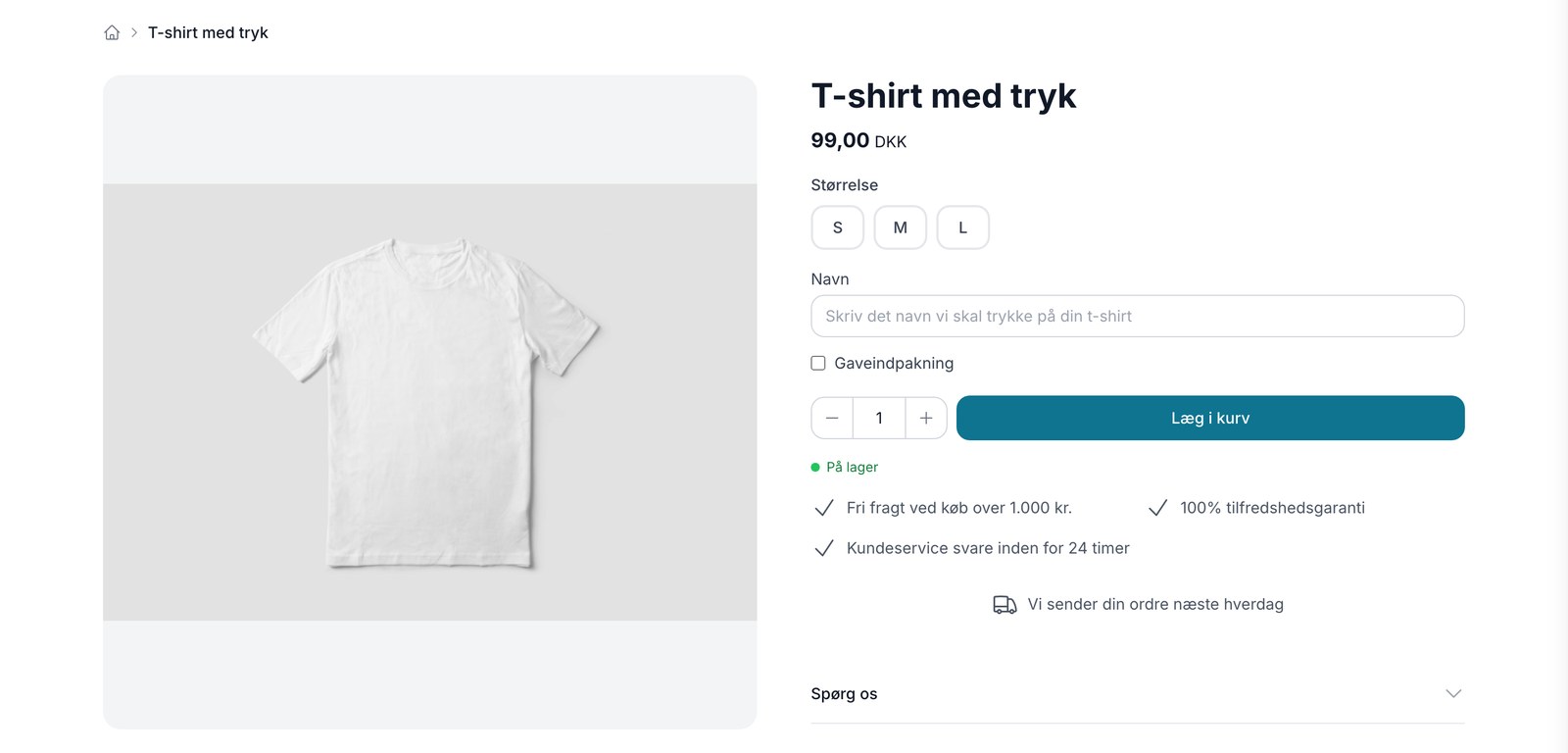
New: Let customers personalize their purchases
Now your customers can enter a name, choose a color, or upload their own design right on the product page. The selections are carried through the...
Product Personalization
Product personalization is when the customer fills in fields on the product page themselves, such as a name for engraving or an uploaded file....