Emergency situation

In case of emergencies or breakdowns, you can send an SMS to our emergency hotline

On-call phone (SMS only)

+45 29 70 15 95

Send an SMS with the following information:

  • Your name and webshop
  • Description of the problem
  • Your callback phone number

Notes: This service is only for critical situations where your webshop is down or has serious problems. For regular support, please use our normal support channels.

Included in all packages

Email marketing that drives sales | Shoporama

Integrate with Klaviyo, Brevo, Mailchimp, Ubivox or Campaign Monitor, or use Shoporama's own newsletter system. Automatic synchronization.

Read more about it

Email marketing that drives sales

Integrate with Klaviyo, Brevo, Mailchimp, Ubivox or Campaign Monitor, or use Shoporama's own newsletter system. Automatic synchronization, event tracking and targeted communication.

The Right Integrations for Your Needs

Email marketing remains one of the most profitable channels for online stores. Shoporama integrates with the most popular platforms, so you can choose the solution that best suits your business:

  • Klaviyo, advanced event tracking, abandoned cart emails, and behavior-based segmentation
  • Brevo, template-based newsletters with API synchronization of customers
  • Mailchimp, the world’s most widely used email marketing platform
  • Ubivox, a Danish email marketing platform
  • Campaign Monitor, an international platform focused on attractive templates and automation

Automatic synchronization

When a customer subscribes to your newsletter, they are automatically added to your mailing list on the platform you use. You don’t have to lift a finger—Shoporama handles the synchronization via API.

Advanced tracking with Klaviyo

If you use Klaviyo, you’ll have access to event tracking, which allows you to send targeted emails based on customer behavior. This could include, for example, an email to customers who have added items to their cart without completing the purchase, or a follow-up email after a purchase featuring related products.

Shoporama’s own newsletter system

If you don’t need an external platform, Shoporama has its own newsletter system with segmentation, campaigns, a drag-and-drop editor, and automated workflows. You can create segments based on customer behavior, build attractive templates, and send emails directly from the admin panel. Contact us for current pricing on email campaigns.
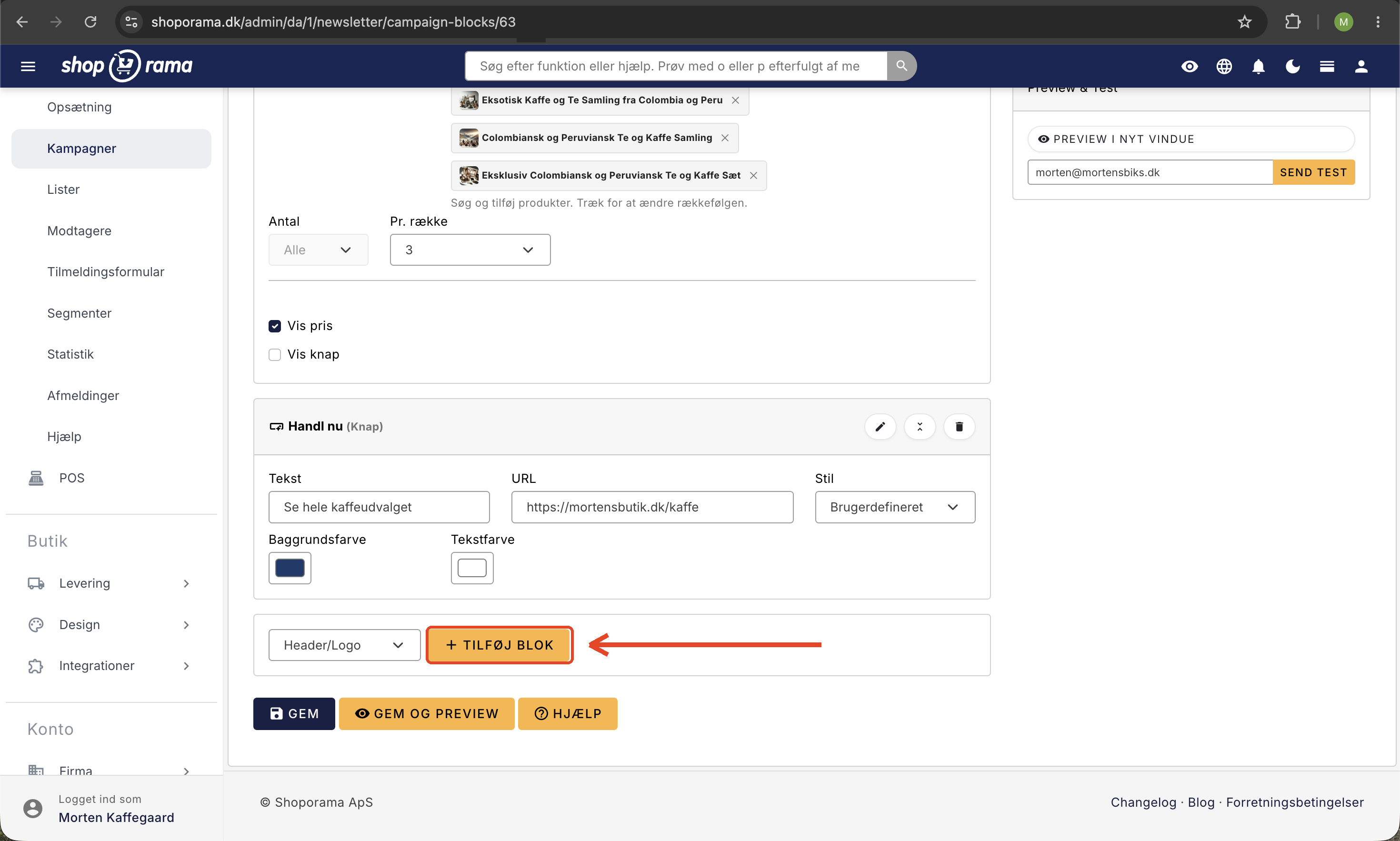
Blok-editoren i Shoporamas nyhedsbrevssystem med en produktblok med tre kaffeprodukter, vis pris slået til, en knap-blok, og knappen Tilføj blok
The newsletter’s drag-and-drop editor, where you build the newsletter using blocks. Here is a product block featuring three coffee products with highlighted prices, combined with a button block; new elements are added using the “Add Block” button.

Automatic inventory notifications

If a product is out of stock, your customers can sign up to be notified when it’s back in stock. As soon as you restock the item, Shoporama automatically sends an email with a direct link to the product. It’s a simple way to avoid lost sales.

Targeted customer communication

From the order overview, you can filter orders by brand and send emails directly to the relevant customers. If you’ve received new products from a specific brand, you can easily reach out to customers who have previously purchased from that brand.

Learn more about the individual integrations: the Newsletter Module, Brevo integration, and Klaviyo integration.

Try it for free - no strings attached

Start your free trial today and see for yourself how this feature can boost your online store. No credit card required.

See all features

Support articles

Read our guides and get started

Brevo integration newsletter signup integration from your webshop

How to connect your Shoporama webshop to Brevo (formerly Sendinblue) so that new newsletter subscriptions...

Mail Test: Send a test of your automated emails

Preview the 23 automated emails you can test, and send a test email to yourself so you can catch errors in order...

The newsletter module

Complete guide to Shoporama's built-in newsletter module. Learn how to create campaigns, segment recipients, use A/B...

See which emails Shoporama has sent

Guide to view a log of all emails Shoporama has sent from your online store.

Unsubscribe links in automatic emails

Give your customers the option to unsubscribe from automatic follow-up emails after purchases and product reviews -...

Settings for transactional emails

How to set when Shoporama automatically sends transactional emails like abandoned baskets, payment reminders and...

Stock notification: Notify your customers when items are back in stock

Learn how to set up email notifications so your customers can be notified when out-of-stock products are restocked in...

Mailing List Integration: Connect Shoporama to Your Newsletter Provider

Automatically forward newsletter sign-up notifications from your online store to Klaviyo, Ubivox, Mailchimp, Campaign...

Send product recommendation emails manually

Shoporama does not have a dedicated 'Send product recommendation email' button. Learn what's actually in the platform...

HeyLoyalty integration

Guide to setting up HeyLoyalty in Shoporama for email marketing with automatic synchronization of subscribers and...

Set up Klaviyo integration

Guide to setting up Klaviyo integration with your Shoporama online store for automated email flows.