How much should shipping cost? Here's how to find the answer in your own store
A new shipping rate can improve conversion by 21% and still generate less revenue. That’s why Shoporama’s A/B tests of shipping rates are based on contribution margin per visitor rather than on conversion rate. Here’s the reasoning behind it, and why we provide results in kroner instead of promising you statistical significance.
The shipping cost is one of the most critical figures in an online store. It appears on the product page, it appears in the shopping cart, and it’s one of the most common reasons a customer closes the tab during checkout. Yet for most people, it’s a figure that was set several years ago based on what the shipping carrier charged back then, plus a little extra.
An A/B test of shipping rates shows two different shipping rates to two separate groups of visitors. The mechanics are simple. What’s interesting is what’s being measured—and why.
More orders, less money
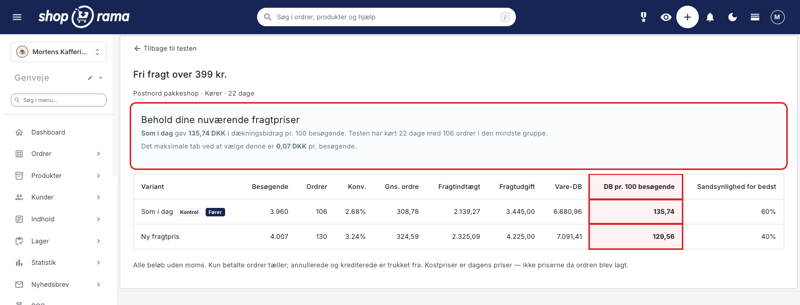
Here’s what a result might look like. This example is from a demo store where a shipping method using a PostNord package shop is being tested with a new shipping rate. The column that determines the test is called “Contribution Margin per 100 Visitors.” Contribution margin is what’s left after the cost of goods and your shipping expenses have been deducted.
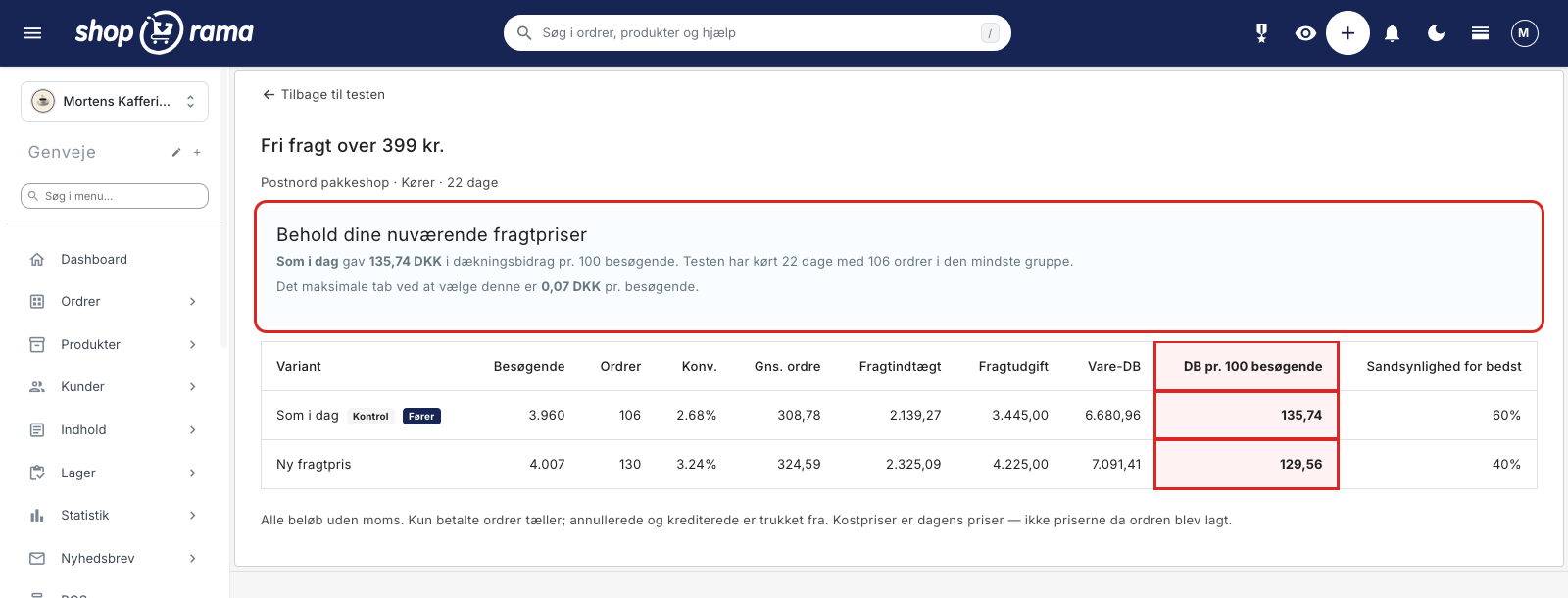
- As of today: 2.68% conversion rate and 135.74 DKK in contribution margin per 100 visitors
- New shipping price: 3.24% conversion rate and 129.56 DKK in contribution margin per 100 visitors
The new shipping price thus converts 21% better. If you look only at the conversion rate, the matter is settled, and you’ll roll out the new price tomorrow. But if you recalculate the contribution margin per order, each order in the new variant brings in about 11 kroner less. The extra orders cannot make up for the lower revenue from all the customers who would have bought anyway. The conclusion on the screen is therefore clear: keep your current shipping rates. The test shown in the image is still running, but it has already met the requirements. The smallest group has 106 orders, and the expected loss from following the conclusion is down to 0.07 DKK per visitor.
It is precisely this scenario that makes it risky to test shipping rates based on gut feeling. Free shipping and low-cost shipping almost always win out in terms of conversion. That doesn’t mean they’re making money.
Why Most Online Stores Never Test Their Shipping Rates
It’s not because store owners don’t care. It’s because the task is actually difficult to tackle manually. To test a shipping rate properly, you need to be able to show two different prices to two groups, maintain the same price all the way from the product page to the receipt, and then calculate what each group spent at checkout, after shipping costs and after the cost of the item.
In practice, it usually ends up being one of two alternatives. Either a decision based on what the competition is doing. Or a “let’s try free shipping for a month and see how sales go,” where the results are impossible to separate from seasonal trends, promotions, the weather, and whatever else happened that month.
And if you do finally measure something, you’re usually measuring the wrong thing. Revenue is a trap when you’re testing shipping: the shipping costs the store itself pays to the shipping company get included in revenue as if they were income. If you lower the shipping price and get more orders, revenue looks good, while shipping costs quietly eat into your profits.
More orders and more money aren’t the same thing
Conversion rate has become e-commerce’s favorite metric because it’s easy to measure and easy to brag about. But the conversion rate only tells you how many people bought something, not what they were worth. Cheaper shipping is a discount for everyone, including those who would have bought anyway. The extra volume must therefore be quite large before it pays for the discount on the entire base volume.
That’s why a shipping test in Shoporama is determined by the contribution margin per visitor. The report still shows conversion rates and average order value per variant because they’re useful metrics to review, but they don’t determine the outcome of the test. The calculation that determines the outcome is the contribution margin on the products plus shipping revenue minus shipping costs, divided by the number of visitors.
For that calculation to hold up, the data must be accurate. Only paid orders are included, and canceled and credited orders are deducted. If cost of goods sold is missing for more than 20% of revenue, the report will clearly indicate this and use your estimated contribution margin for the remainder. The report also notes that cost prices are based on today’s prices, not the prices on the day the order was placed. You should be able to see what the figure is based on, even when it isn’t perfect.
We don’t promise statistical significance. We give answers in Danish kroner
Here’s the uncomfortable truth about A/B testing in Danish e-commerce: most online stores don’t have enough traffic. Shipping prices typically affect conversion rates by 5 to 15%, and a difference of that magnitude requires a large number of visitors before it can be distinguished from random noise. If you have fewer than 15,000 visitors per month, you should expect your shipping test to end in a draw.
We could have hidden that behind a green “significant” badge. We believe that a tool that pretends to be effective is worse than nothing, because it leads you to change prices based on unfounded assumptions. So instead, we do two things.
First, we’re honest from the start. As soon as you set up the test, the screen shows what your own traffic can actually demonstrate, for example: “Over the last 30 days, you’ve had 10,936 visitors and a 1.76% conversion rate,” followed by a table showing the earliest you can expect to see a difference after 2, 4, and 8 weeks. In the example below, the figures are 59%, 41%, and 29%. This gives you an idea of how significant an effect the traffic can reveal, and these numbers are a reality check for most people. That’s the point.
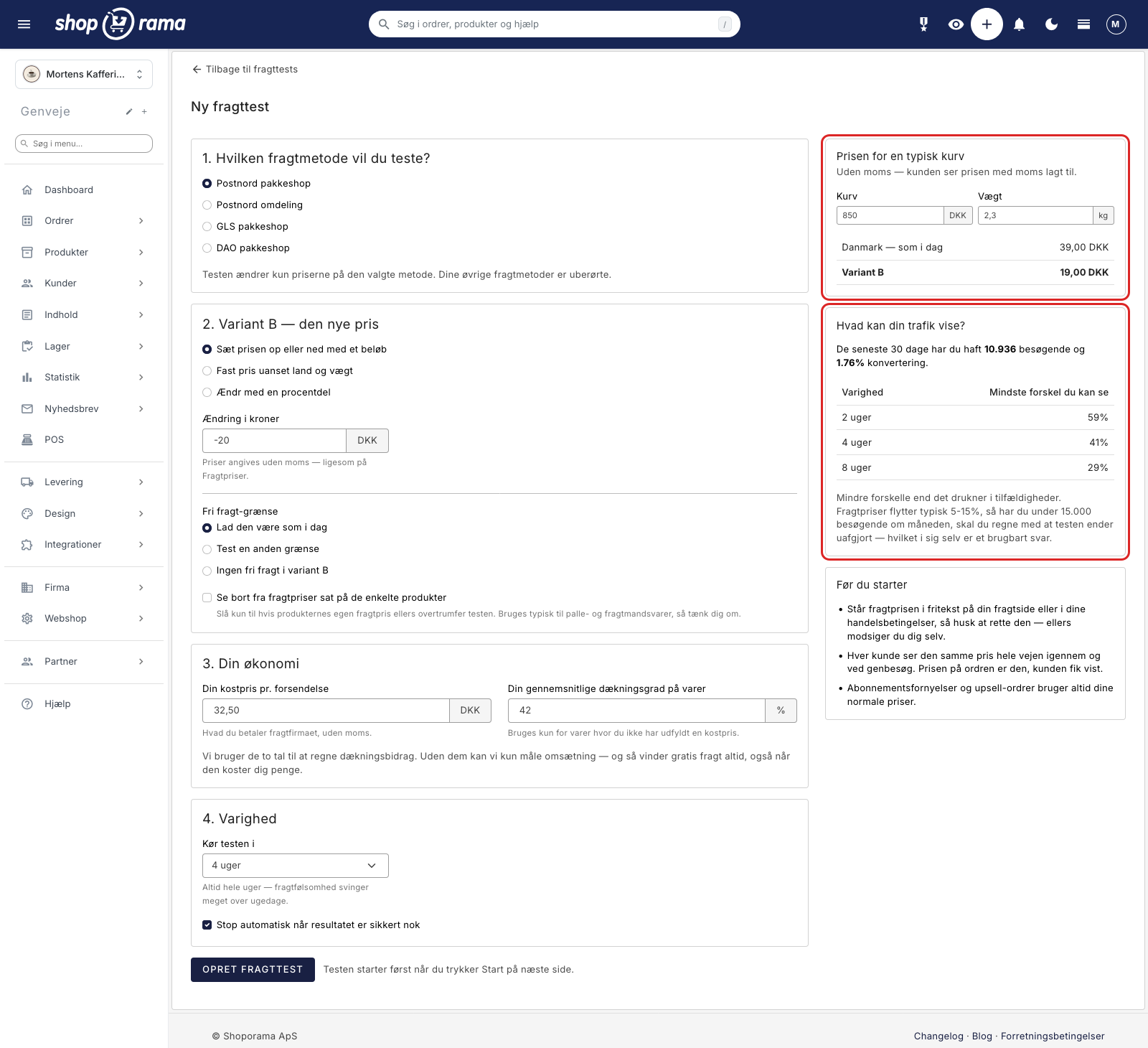
Second, we provide results in Danish kroner rather than statistics. Once the test is complete, you’ll get a figure in kroner—for example, 0.07 kr per visitor. That’s what it will cost you on average per visitor if you choose that variant, and it turns out not to be the best one after all. So this isn’t a guaranteed upper limit on what you might lose, but rather the average expected loss from making the wrong choice. Seven øre per visitor is a price any store owner can relate to. A p-value is not.
A winner is declared only when three conditions are met: the test has run for at least 14 days, there are at least 100 orders in each of the two variants, and the expected loss from choosing the leading variant is no more than 10 øre per visitor. If the result is not yet decided, it states exactly how close the race is, for example: “The test has been running for 12 of at least 14 days. The smaller group has 63 orders (target: 100).”
A tie is a valid result
The most underrated result in a split test is a tie. It feels like a waste of time, but it’s actually a valid result: the difference between the two shipping prices is so small that it gets lost in the noise, and you can safely choose the solution that best suits your store for other reasons. Perhaps the one that’s easiest to communicate. Perhaps the one that results in the fewest support inquiries.
If a test has been running for a long time without reaching a definitive answer, the report states it plainly: with the current traffic, it’s unlikely to reach a definitive answer, and the difference is small enough that the choice can be made based on factors other than numbers. If the test has stopped without a definitive answer, you can still choose for yourself. In that case, the results page will say “Choose yourself” with an “Activate” button.
The report also monitors whether traffic is distributed unevenly between the two variants and alerts you if it is, because then the comparison isn’t fair. And here’s some good advice on top of that: don’t check the numbers every day and stop when they look good. If you do that, you’ll find a winner almost every time—even when there isn’t one.
How the test works in practice
You’ll find the feature under Delivery > Split Test Shipping Rates, and there’s a shortcut under Delivery > Shipping Methods, where the button is labeled “Split Test Shipping Rates.” Setup involves four steps: which shipping method you want to test, what the new price should be in variant B, your financials including cost price and profit margin, and how long the test should run. There is no name field. The test is automatically named after the shipping method, and you can rename it afterward under Settings on the test’s own page.
A shipping test always has exactly two variants: “As is” and “New Shipping Price,” and visitors are split 50/50 between them. The test applies to one shipping method at a time, and the other shipping methods remain completely unaffected. You define the new price as either an amount higher or lower, a fixed price, or a percentage, and you can test the free shipping threshold on its own.
- Each visitor is assigned one variant and sees the same price throughout the entire process: product page, cart, checkout, and on return visits. The assignment remains in effect for up to 30 days, and the price on the order is the one the customer was shown.
- The free shipping progress bar in the shopping cart follows the variant’s threshold, so no one is promised one threshold and charged based on another.
- Subscription renewals and upsell orders always use the store’s normal prices, never the test prices.
- Search engines and bots always see your current prices and are not included in the statistics.
- While the test is running, the store’s static page cache is disabled, so pages load slightly slower than usual. This returns to normal when the test is stopped.
A test is always created as a draft and doesn’t start until you click Start. The checkbox “Stop automatically when the result is reliable enough” is enabled by default, so the test stops on its own when the result is reliable enough or when the end date is reached. You can also stop it yourself at any time. Regardless of how the test ends, your prices will never change automatically. You’ll receive a notification, and then you can decide for yourself.
If you want to use the result, click “Activate Permanently”; if you change your mind, a “Cancel” button will revert the price per country, the weight-based prices, and the free shipping threshold to their original values. Once the prices are activated, the test can neither be restarted nor deleted. This is intentional: the test is the only place where the old prices are stored, so deleting it would also remove the option to undo the change.
Only one shipping test can run at a time per store, but you can prepare the next one in the meantime. Once the test has started, the price setup—that is, the shipping method, variant B, the free shipping threshold, the cost price, and the coverage ratio—is locked, because the collected data pertains specifically to that setup. You can still change the name, duration, and the “auto-stop” checkbox during the test, and an active test can be extended.
What You Should Test First
If you’re only running one shipping test this year, test your free shipping threshold. It’s the factor that affects both cart size and shipping costs at the same time, and it’s the one people most often set based on gut feeling. If, on the other hand, you suspect that shipping rates are set incorrectly for a specific country or weight range, it makes sense to start there—and your shipping statistics are a good place to figure out where.
And just a practical note before you begin: if the shipping price is listed as free-form text on your shipping page or in your terms of service, it needs to be corrected; otherwise, your store will be contradicting itself for half of your customers.
If you’re ready to get started, the entire setup is described step by step in our guide to A/B testing shipping rates. If you first need to determine the threshold itself, you can read about free shipping over a certain amount, and if prices need to be fine-tuned before the test, there’s help available for shipping rates by country and weight-based shipping rates. If you have questions about how to interpret the numbers for your specific store, please email support@shoporama.dk.
Related articles
Free shipping over a certain amount
How to set up free shipping above a certain amount in Shoporama. The amount limit is set per country under Store, Shipping, Countries, and applies...
A/B Testing of Shipping Rates: Find the Shipping Rate That Generates the Most Revenue
How to Use A/B Testing for Shipping Rates in Shoporama: Show two shipping rates to two separate groups of your visitors, and see which one yields...
Shipping Rates: How to Set Rates by Country and Amount
How to use the pricing matrix under "Shipping Rates": one price per country and shipping method, empty fields that default to 0 DKK, free shipping...
Create a new shipping option
Guide to creating new shipping options and assigning them to countries in Shoporama.
Weight-Based Rates: Shipping costs based on weight
How to set up weight-based shipping in Shoporama. Create weight ranges in grams, set prices by country and shipping method, and see what happens...
Shipping Statistics: Which delivery options do your customers choose?
See which shipping methods your customers choose, how many orders each method receives, and how much they pay for shipping. Here’s how to use these...
More from the blog
The picking list has been redesigned: scan the items, print the picking slip
The picking list has been completely redesigned. You can now scan items with a standard barcode scanner, print both a picking slip per order and a...
08. september 2026
Product filtering is here, and you build the filter yourself
Product filtering is currently available in the Montana and MontanaB2B themes and can be added to your own theme. You can set up the filter...
02. september 2026
The newsletter sign-up form shouldn't always pop up
Your sign-up form no longer has to be a pop-up. Now you can copy it right where you want it to appear and run multiple different forms, each for...
31. august 2026